Join us at FabCon Atlanta from March 16 - 20, 2026, for the ultimate Fabric, Power BI, AI and SQL community-led event. Save $200 with code FABCOMM.
Register now!The Power BI Data Visualization World Championships is back! Get ahead of the game and start preparing now! Learn more
Hi everyone,
I am new to Power BI and look to solve the following problem:
I have a table of strings that looks something like this:
Column 1 Column 2
A Yes
A Yes
A No
B Maybe
B Maybe
C Technical
D Technical
D Contract
I want to count (sum) all variables in column 2 for each variable in column 1.
Preffered output looks like:
Column 1 Column 2 Column 3
A Yes 2
A No 1
B Maybe 2
C Technical 1
D Technical 1
D Contract 1
Does anyone know how to solve this? Thank you very much in advance!
With kind regards,
Martijn Kamps
Solved! Go to Solution.
Hi @Martijnkamps,
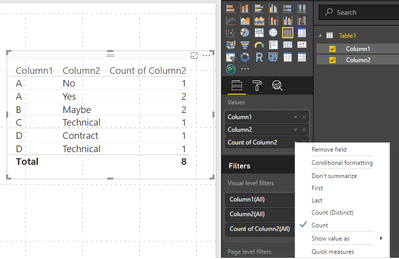
If you add the column 1 and column 2 to a table or matrix visual you will get the first two columns on your example, please make sure you have it as don't summarize, then just add the column 2 again and choose the option count and you will get the desired visual check print below.
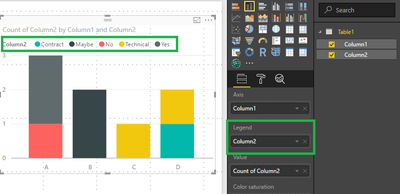
You can also put it in a graph but be sure to put column 2 in the legend:
Regards,
MFelix
Regards
Miguel Félix
Proud to be a Super User!
Check out my blog: Power BI em PortuguêsHi @Martijnkamps,
If you add the column 1 and column 2 to a table or matrix visual you will get the first two columns on your example, please make sure you have it as don't summarize, then just add the column 2 again and choose the option count and you will get the desired visual check print below.
You can also put it in a graph but be sure to put column 2 in the legend:
Regards,
MFelix
Regards
Miguel Félix
Proud to be a Super User!
Check out my blog: Power BI em PortuguêsThe Power BI Data Visualization World Championships is back! Get ahead of the game and start preparing now!
| User | Count |
|---|---|
| 40 | |
| 36 | |
| 34 | |
| 31 | |
| 27 |
| User | Count |
|---|---|
| 135 | |
| 103 | |
| 65 | |
| 61 | |
| 55 |