cancel
Showing results for 
Search instead for 
Did you mean: 

July 7 - July 17 | Round 2 of the Power BI Dataviz World Championships. Don't miss your chance! Learn more

Reply
Martijnkamps
Regular Visitor

Filtering and Count issues

Hi everyone,


I am new to Power BI and look to solve the following problem:


I have a table of strings that looks something like this:


Column 1              Column 2
A                           Yes
A                           No
B                           Maybe
C                          Technical
D                          Technical
D                          Contract

I want to count (sum) all variables in column 2 for each variable in column 1.

Preffered output looks like:


Column 1             Column 2              Column 3

A                          Yes                        2

A                          No                         1

B                          Maybe                   2

C                         Technical                1
D                         Technical                1

D                         Contract                 1


Does anyone know how to solve this? Thank you very much in advance!


With kind regards,
Martijn Kamps

1 ACCEPTED SOLUTION
MFelix
Super User
Super User

Hi @Martijnkamps,


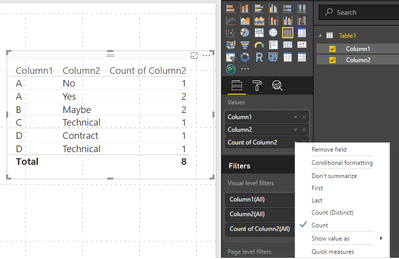
If you add the column 1 and column 2 to a table or matrix visual you will get the first two columns on your example, please make sure you have it as don't summarize, then just add the column 2 again and choose the option count and you will get the desired visual check print below.


Table.png


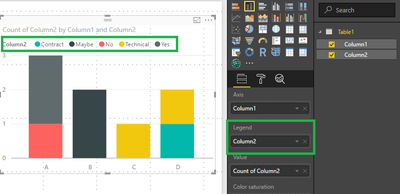
You can also put it in a graph but be sure to put column 2 in the legend:


Graph.png


Regards,

MFelix


Regards

Miguel Félix


Did I answer your question? Mark my post as a solution!

Proud to be a Super User!

Check out my blog: Power BI em Português


View solution in original post

1 REPLY 1
MFelix
Super User
Super User

Hi @Martijnkamps,


If you add the column 1 and column 2 to a table or matrix visual you will get the first two columns on your example, please make sure you have it as don't summarize, then just add the column 2 again and choose the option count and you will get the desired visual check print below.


Table.png


You can also put it in a graph but be sure to put column 2 in the legend:


Graph.png


Regards,

MFelix


Regards

Miguel Félix


Did I answer your question? Mark my post as a solution!

Proud to be a Super User!

Check out my blog: Power BI em Português


Helpful resources

Announcements
FabCon and SQLCon Barcelona 2026

FabCon & SQLCon – Barcelona 2026

Join us in Barcelona for FabCon and SQLCon, the Fabric, Power BI, SQL, and AI community event. Save €200 with code FABCMTY200.

60 days of Data Days Carousel

Data Days 2026

Join Fabric Data Days 2026: 60 days of free live/on-demand sessions, challenges, study groups, and certification opportunities.

Power BI DataViz World Championships carousel

Power BI DataViz World Championships - June 2026

A new Power BI DataViz World Championship is coming this June! Don't miss out on submitting your entry.