Get certified for free when you join Fabric Data Days 2026 and dive into Fabric, Power BI, SQL, AI, and other essential data skills.
Join nowTry your skills in the Power BI Dataviz World Championship! Round one ends June 26. Join now
Hi everyone,
I am new to Power BI and look to solve the following problem:
I have a table of strings that looks something like this:
Column 1 Column 2
A Yes
A Yes
A No
B Maybe
B Maybe
C Technical
D Technical
D Contract
I want to count (sum) all variables in column 2 for each variable in column 1.
Preffered output looks like:
Column 1 Column 2 Column 3
A Yes 2
A No 1
B Maybe 2
C Technical 1
D Technical 1
D Contract 1
Does anyone know how to solve this? Thank you very much in advance!
With kind regards,
Martijn Kamps
Solved! Go to Solution.
Hi @Martijnkamps,
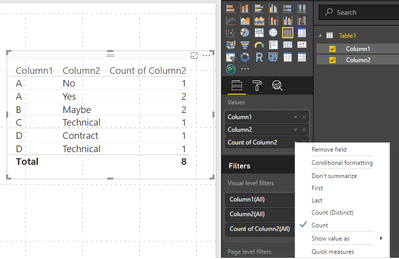
If you add the column 1 and column 2 to a table or matrix visual you will get the first two columns on your example, please make sure you have it as don't summarize, then just add the column 2 again and choose the option count and you will get the desired visual check print below.
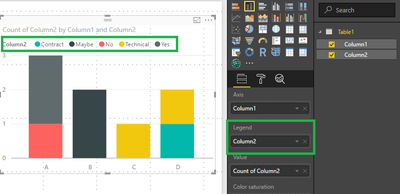
You can also put it in a graph but be sure to put column 2 in the legend:
Regards,
MFelix
Regards
Miguel Félix
Proud to be a Super User!
Check out my blog: Power BI em PortuguêsHi @Martijnkamps,
If you add the column 1 and column 2 to a table or matrix visual you will get the first two columns on your example, please make sure you have it as don't summarize, then just add the column 2 again and choose the option count and you will get the desired visual check print below.
You can also put it in a graph but be sure to put column 2 in the legend:
Regards,
MFelix
Regards
Miguel Félix
Proud to be a Super User!
Check out my blog: Power BI em Português| User | Count |
|---|---|
| 22 | |
| 21 | |
| 20 | |
| 20 | |
| 11 |
| User | Count |
|---|---|
| 62 | |
| 55 | |
| 46 | |
| 45 | |
| 34 |