This is best Fabric, Power BI, SQL and AI community event. How do we know? The last event sold out! Save €200 with code FABCMTY200.
Register nowA new Data Days event is coming soon! This time we’re going bigger than ever. Fabric, Power BI, SQL, AI and more. Don't miss out.
Dear community,
I need your help.
I have a Table_A containing 2 columns:
- ID
- Description
I have a Table_B containing one column:
- Lookup
And I'd like to filter the rows in Table_A using the following rule: select * from Table_A where description "contains" any value in the column Lookup.
Let me explain better with an example:
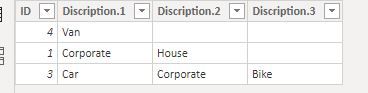
Table_A
1 Corporate|House
2 House
3 Car|Corporate|Bike
4 Van
Table_B
Corporate
Van
I want to return the rows 1,3 and 4 becasue they contains one of the values in the Table_B
Many thanks
A.
Solved! Go to Solution.
I think I found a solution in this article:
Hope this can be of any help to other users as well
A.
@aabati
I assumed there is a relationship between the tables, you would need to first split the description column by "|“. Then create a calculated table using the below function to filtered the matched results.
BTW you could use CONCATENATE function to join them together if needed.
Best,
Paul
Thanks Paul for the replay
I understand you solution but in my case I dont have a defined and limited number of | (pipe delimiters).
This is why I was looking for a kind of "Select like %' function.
Thanks
A.
I think I found a solution in this article:
Hope this can be of any help to other users as well
A.
You may want to look at this blog post as it is a similar data structure. https://marqueeinsights.com/how-to-work-with-sharepoint-multi-value-columns-in-power-bi/
What you don't have is a cross-reference between Table A and Table B. The post shows you how to easily do this and set up the relationships so that you can filter as described.
Hope this helps!
--Treb, Power BI MVP
Check out our Power BI blog posts at https://marqueeinsights.com/category/power-bi/
Sign up to receive a private message when registration opens and key events begin.
If you have recently started exploring Fabric, we'd love to hear how it's going. Your feedback can help with product improvements.
| User | Count |
|---|---|
| 32 | |
| 26 | |
| 21 | |
| 20 | |
| 15 |
| User | Count |
|---|---|
| 65 | |
| 41 | |
| 28 | |
| 22 | |
| 22 |