Share feedback directly with Fabric product managers, participate in targeted research studies and influence the Fabric roadmap.
Sign up nowGet Fabric certified for FREE! Don't miss your chance! Learn more
Hi,
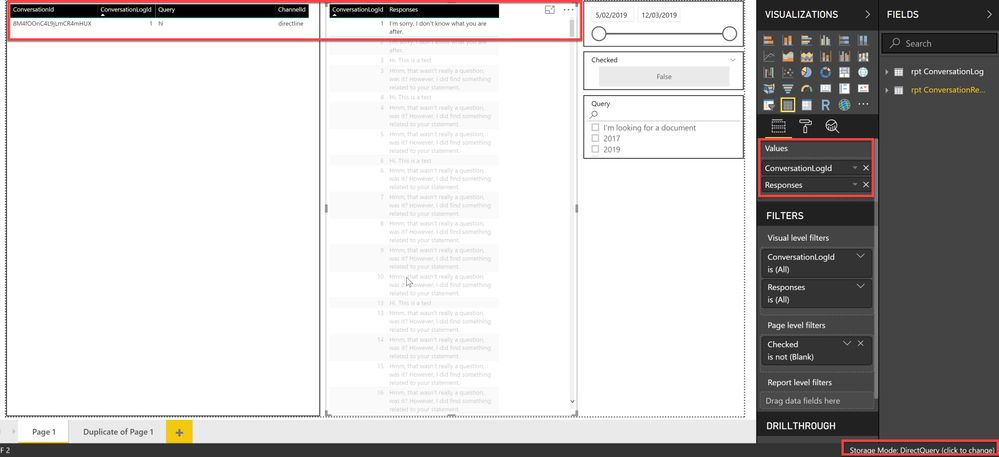
I am experiencing a filtering issue between table visuals in DirectQuery mode.
I sourced the dataset from SQL server via DirectQuery mode. As shown in screenshot 1 and 2, table visuals do not filter correctly when the Timestamp field (data type: Date/Time) is included in the table. This is only an issue in DirectQuery mode. As you can see in screenshot 3, when I switch to import, the filters work fine even when the Timestamp field is included in the table.
screenshot 1
screenshot 2
screenshot 3
Solved! Go to Solution.
Hi,
Eventually, we spotted that the issue happened because Power BI does not like milliseconds.
When I was querying the Timestamp field without milliseconds, the filtering was working even in DirectQuery mode.
Hi,
Eventually, we spotted that the issue happened because Power BI does not like milliseconds.
When I was querying the Timestamp field without milliseconds, the filtering was working even in DirectQuery mode.
@LexiQiang ,
Glad to hear the issue is solved, you can accept your reply as solution to close this issue.
Regards,
Lydia
Thankyou for posting the problem, at least I can say I'm in the same boaat,
so dont display datetime fields in direct mode, you wont be able to filter data.
I think that Microsoft should solve this annoying bug and cannot consider this a solution....
Regards
Share feedback directly with Fabric product managers, participate in targeted research studies and influence the Fabric roadmap.
| User | Count |
|---|---|
| 63 | |
| 62 | |
| 42 | |
| 19 | |
| 16 |
| User | Count |
|---|---|
| 118 | |
| 106 | |
| 38 | |
| 28 | |
| 27 |