cancel
Showing results for 
Search instead for 
Did you mean: 

The Power BI Data Visualization World Championships is back! It's time to submit your entry. Live now!

Reply
LexiQiang
Frequent Visitor

Filtering Issue between Table Visuals in DirectQuery

Hi,


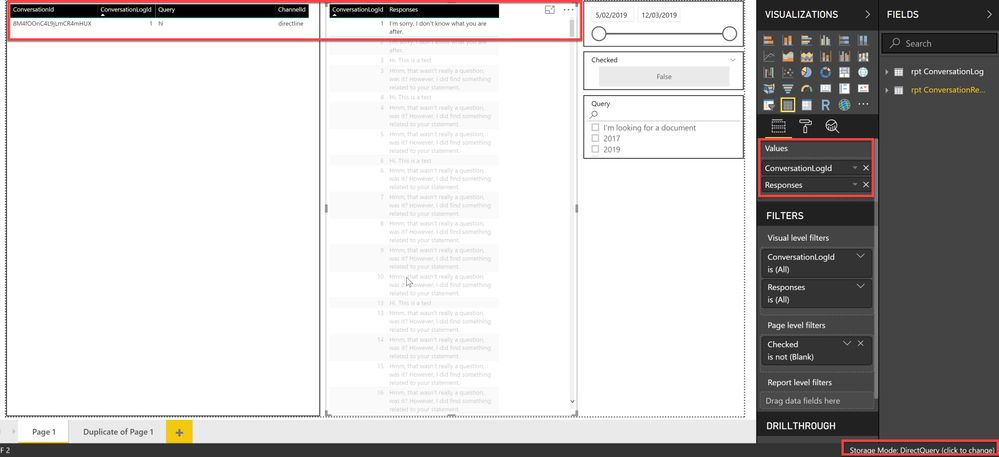
I am experiencing a filtering issue between table visuals in DirectQuery mode.


I sourced the dataset from SQL server via DirectQuery mode. As shown in screenshot 1 and 2,   table visuals do not filter correctly when the Timestamp field (data type: Date/Time) is included in the table. This is only an issue in DirectQuery mode. As you can see in screenshot 3, when I switch to import, the filters work fine even when the Timestamp field is included in the table.


screenshot 1screenshot 1screenshot 2screenshot 2screenshot 3screenshot 3


1 ACCEPTED SOLUTION
LexiQiang
Frequent Visitor

Hi,


Eventually, we spotted that the issue happened because Power BI does not like milliseconds. 

When I was querying the Timestamp field without milliseconds, the filtering was working even in DirectQuery mode.

View solution in original post

3 REPLIES 3
LexiQiang
Frequent Visitor

Hi,


Eventually, we spotted that the issue happened because Power BI does not like milliseconds. 

When I was querying the Timestamp field without milliseconds, the filtering was working even in DirectQuery mode.

Anonymous
Not applicable

@LexiQiang ,

Glad to hear the issue is solved, you can accept your reply as solution to close this issue.

Regards,
Lydia

Anonymous
Not applicable

Thankyou for posting the problem, at least I can say I'm in the same boaat,

so dont display datetime fields in direct mode, you wont be able to filter data.

I think that Microsoft should solve this annoying bug and cannot consider this a solution....

Regards

Helpful resources

Announcements
FabCon Atlanta 2026 carousel

FabCon Atlanta 2026

Join us at FabCon Atlanta, March 16-20, for the ultimate Fabric, Power BI, AI and SQL community-led event. Save $200 with code FABCOMM.