This time we’re going bigger than ever. Fabric, Power BI, SQL, AI and more. We're covering it all. You won't want to miss it.
Learn moreDid you hear? There's a new SQL AI Developer certification (DP-800). Start preparing now and be one of the first to get certified. Register now
Hi all,
My task is rather simple, or so I thought. Can't get to solve it or find a proper solution on the net.
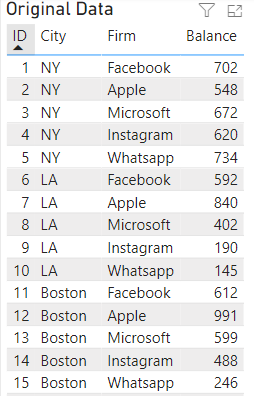
I have a large data table, let's say with this structure:
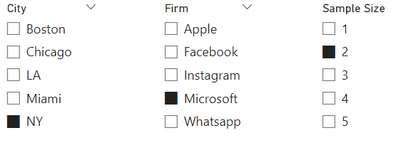
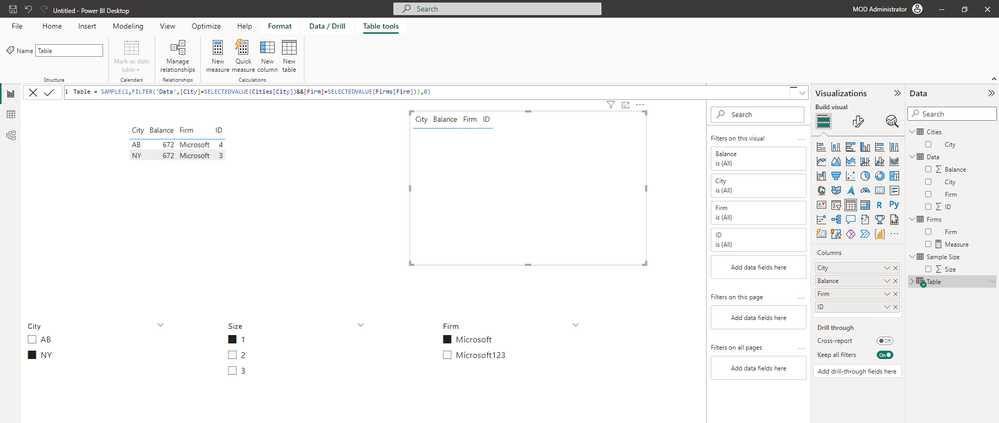
On a desktop page, I let the user slice this data (let's say by City and Firm slicers), and added a "Sample Size" slicer (for simplicity, with absolute numbers, and not percentage):
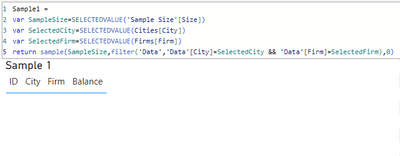
I want to show a sample result, of course filtered by City and Firm, and with the Correct sample size (assuming there's enough data...).
I thought this would be the easy and correct solution, but the SelectedValue vars return blank values, and the entire sample ends up empty.
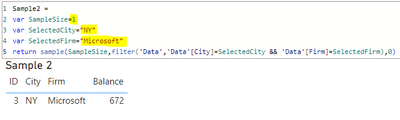
When I replace the SelectedValue vars with specific values, it works well, but of course doesn't do what I want:
How do I make the SelectedValue functions "see" the slicers on the page?
Solved! Go to Solution.
Hi @AviramWeiss ,
I tried to reproduced it.
And based on your description, you were creating a calculated table, right?
However, the SELECTEDVALUE function is unavailable in a calculated table. Calculated tables are similar to calculated columns, but different from measures. Measures return results dynamically, so the SELECTEDVALUE function can be used in measures to dynamically return results based on slicer selection. However, calculated tables and calculated columns are static return results, so this does not apply here.
Best Regards,
Stephen Tao
If this post helps, then please consider Accept it as the solution to help the other members find it more quickly.
Hi @AviramWeiss ,
I tried to reproduced it.
And based on your description, you were creating a calculated table, right?
However, the SELECTEDVALUE function is unavailable in a calculated table. Calculated tables are similar to calculated columns, but different from measures. Measures return results dynamically, so the SELECTEDVALUE function can be used in measures to dynamically return results based on slicer selection. However, calculated tables and calculated columns are static return results, so this does not apply here.
Best Regards,
Stephen Tao
If this post helps, then please consider Accept it as the solution to help the other members find it more quickly.
Check out the April 2026 Power BI update to learn about new features.
Sign up to receive a private message when registration opens and key events begin.
If you have recently started exploring Fabric, we'd love to hear how it's going. Your feedback can help with product improvements.
| User | Count |
|---|---|
| 34 | |
| 31 | |
| 25 | |
| 20 | |
| 16 |
| User | Count |
|---|---|
| 60 | |
| 48 | |
| 29 | |
| 23 | |
| 23 |