cancel
Showing results for 
Search instead for 
Did you mean: 

The Power BI Data Visualization World Championships is back! Get ahead of the game and start preparing now! Learn more

Reply
Peter_2020
Helper III
Helper III

Filter with specific definition

Hi all, 

I would like to ask you for help with DAX formula for following situation:

I have this simple table with 2 columns where is order number and operation number:

ORDEROPERATION
1111
1112
2221
3331
3332
3333
3334

And I need to have the list of all orders with note if the specific order contains operation 2 and 4. So expected outcome will looks like this:

ORDERMEASURE
1110
2220
3331

0 means that order doesn´t contain operation 2 and 4 and 1 means that order contains operation 2 and 4.


Any idea how to do it?

Thanks.

P. 

1 ACCEPTED SOLUTION
v-angzheng-msft
Community Support
Community Support

Hi, @Peter_2020 


Try to create a measure like this:

Measure = 
VAR _OR_OP=SUMMARIZE(FILTER(ALL('Table'),'Table'[ORDER]=MAX('Table'[ORDER])),[OPERATION])
VAR _IF=
    IF( {2} IN _OR_OP&&{4} IN _OR_OP
        ,1,0
        )

RETURN _IF

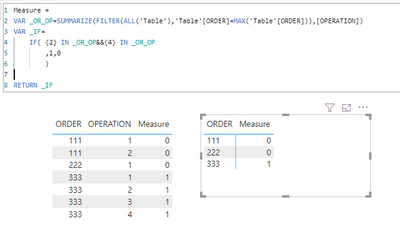
Result:

vangzhengmsft_0-1636950094251.png


Please refer to the attachment below for details. Hope this helps.


Best Regards,
Community Support Team _ Zeon Zheng


If this post helps, then please consider Accept it as the solution to help the other members find it more quickly.

View solution in original post

4 REPLIES 4
v-angzheng-msft
Community Support
Community Support

Hi, @Peter_2020 


Try to create a measure like this:

Measure = 
VAR _OR_OP=SUMMARIZE(FILTER(ALL('Table'),'Table'[ORDER]=MAX('Table'[ORDER])),[OPERATION])
VAR _IF=
    IF( {2} IN _OR_OP&&{4} IN _OR_OP
        ,1,0
        )

RETURN _IF

Result:

vangzhengmsft_0-1636950094251.png


Please refer to the attachment below for details. Hope this helps.


Best Regards,
Community Support Team _ Zeon Zheng


If this post helps, then please consider Accept it as the solution to help the other members find it more quickly.

@v-angzheng-msft Thanks a lot! it works!

amitchandak
Super User
Super User

@Peter_2020 , Measure like


Countx(Summarize(Table, Table[Opearation], "_1",calculate(distinctcount(Table[Operation]) , filter(Table, Table[Operation] in {2,4}  ))) , if( [_1]=2,1,0) )

Share with Power BI Enthusiasts: Full Power BI Video (20 Hours) YouTube
Microsoft Fabric Series 60+ Videos YouTube
Microsoft Fabric Hindi End to End YouTube

@amitchandak Thanks for the tip but the result is for all orders the same - value 1....

Helpful resources

Announcements
Power BI DataViz World Championships

Power BI Dataviz World Championships

The Power BI Data Visualization World Championships is back! Get ahead of the game and start preparing now!

December 2025 Power BI Update Carousel

Power BI Monthly Update - December 2025

Check out the December 2025 Power BI Holiday Recap!

FabCon Atlanta 2026 carousel

FabCon Atlanta 2026

Join us at FabCon Atlanta, March 16-20, for the ultimate Fabric, Power BI, AI and SQL community-led event. Save $200 with code FABCOMM.