cancel
Showing results for 
Search instead for 
Did you mean: 

The FabCon + SQLCon recap series starts April 14th at 8am Pacific. If you’re tracking where AI is going inside Fabric, this first session is a can't miss. Register now

Reply
Anonymous
Not applicable

Filter the same table two times with item slicer

Hi community,


I have two tables

People table:

People namePeople id
Amy001
Peter002
Paul003


Poject table:

People IDproject ID
001XX
001YY
001ZZ
002XX
002YY
003ZZ
004ZZ
004QQ


image.png

I connected two tables with one to many relationship by People ID.


My task is that once the people name is selected in the slicer, I need to calculate number of people participate in the same project.


For example, If I select Amy in the slicer, Amy participated in Project XX, YY and ZZ, and I see people ID 002, 003, 004 also participated in the projects that Amy has participated in, so the total number of people partcipated in Amy's project are 4 (001, 002, 003, 004).


I tried to extract the list of project that Amy has partcipanted in with below measure


Number of related project = 
var selectedPeople = SELECTEDVALUE(People[People Name])
return
    calculate(
        distinctcount(project[project ID]),
        People[People Name] = selectedPeople 
    )


This measure only count the number of projects Amy has partcipating.
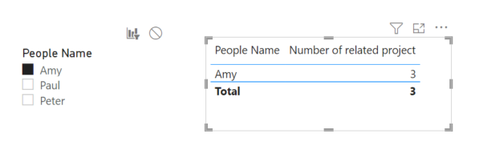
image.png


The question is how to distinct count the number of people who share the same project with selected people in slicer?


2 REPLIES 2
amitchandak
Super User
Super User

@Anonymous , In sunc case prefer to use an independent people table


Number of related project =
var _tab = summzarize(filter(project, project[People ID] in SELECTEDVALUE(People[People ID])), [Project ID]
return
calculate(
distinctcount(project[project ID]),filter( project, project[Project ID] in _tab))


or when joined


Number of related project =
var _tab = summzarize(filter(project, project[People ID] in SELECTEDVALUE(People[People ID])), [Project ID]
return
calculate(
distinctcount(project[project ID]),filter( project, project[Project ID] in _tab), removefilter(People) )

Share with Power BI Enthusiasts: Full Power BI Video (20 Hours) YouTube
Microsoft Fabric Series 60+ Videos YouTube
Microsoft Fabric Hindi End to End YouTube
Anonymous
Not applicable

Hi @amitchandak,


Thanks for replying. Could you explain more on two measures you provide?

I tried to create those measure, but there are syntax error in the var _tab.

image.png


Helpful resources

Announcements
New to Fabric survey Carousel

New to Fabric Survey

If you have recently started exploring Fabric, we'd love to hear how it's going. Your feedback can help with product improvements.

Power BI DataViz World Championships carousel

Power BI DataViz World Championships - June 2026

A new Power BI DataViz World Championship is coming this June! Don't miss out on submitting your entry.

Join our Fabric User Panel

Join our Fabric User Panel

Share feedback directly with Fabric product managers, participate in targeted research studies and influence the Fabric roadmap.

March Power BI Update Carousel

Power BI Community Update - March 2026

Check out the March 2026 Power BI update to learn about new features.
