Join us at FabCon Atlanta from March 16 - 20, 2026, for the ultimate Fabric, Power BI, AI and SQL community-led event. Save $200 with code FABCOMM.
Register now!The Power BI Data Visualization World Championships is back! Get ahead of the game and start preparing now! Learn more
Hi,
I would like to filter numbers out based on if they exist in another table.
Example given.
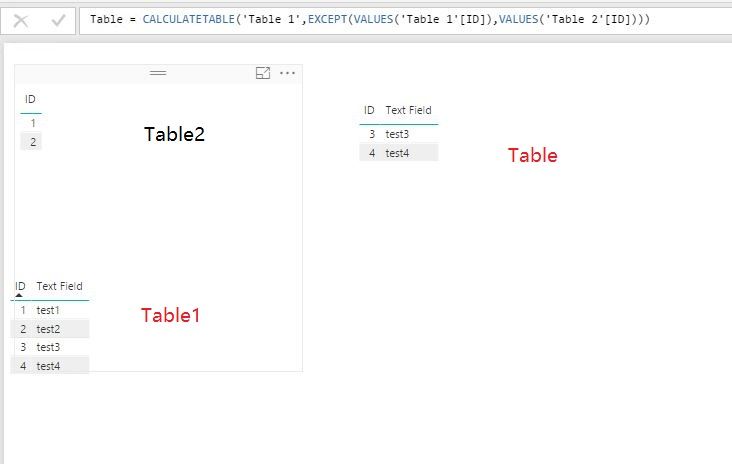
Table 1 consist
ID Text Field
Table 2 consist
ID
I'd like to filter Table 1, removing all the rows where the number from Table 2 ID exist.
I've tried by making a new table with Column = EXCEPT(VALUES(Table1[ID]);VALUES(Table2[ID]))
Which gives me a new table that filters perfectly. however I need to keep my second column "Text Field".
Any ideas?
Solved! Go to Solution.
@Anonymous,
Use the DAX below instead.
Table = CALCULATETABLE(Table1;EXCEPT(VALUES(Table1[ID]);VALUES(Table2[ID])))
Regards,
Lydia
Thanks alot! Works like a charm!
@Anonymous,
Use the DAX below instead.
Table = CALCULATETABLE(Table1;EXCEPT(VALUES(Table1[ID]);VALUES(Table2[ID])))
Regards,
Lydia
@Anonymous I am trying to do something similar, but do not want to build another table. Instead, I want to calculate measures based on the filter that will be visualized on a matrix in a report. For example:
Table A
| ID | Cost | Revenue |
| 11 | 2 | 4 |
| 12 | 3 | 5 |
| 13 | 3 | 7 |
| 14 | 5 | 11 |
Table B (discontinuation)
| ID |
| 11 |
| 12 |
Matrix on report:
| Before Disc | After Disc | |
| Total Cost | 13 | 8 |
| Total Revenue | 27 | 18 |
Any recommendations? Thank you!!
What if I want to keep the values in table 2 and filter out the remaining values from table 1?
I believe you can use INTERSECT instead of EXCEPT
The Power BI Data Visualization World Championships is back! Get ahead of the game and start preparing now!
Check out the November 2025 Power BI update to learn about new features.
| User | Count |
|---|---|
| 59 | |
| 46 | |
| 42 | |
| 23 | |
| 18 |
| User | Count |
|---|---|
| 193 | |
| 123 | |
| 99 | |
| 67 | |
| 49 |