Join us at FabCon Atlanta from March 16 - 20, 2026, for the ultimate Fabric, Power BI, AI and SQL community-led event. Save $200 with code FABCOMM.
Register now!The Power BI Data Visualization World Championships is back! Get ahead of the game and start preparing now! Learn more
Dear, I have the following table where an invoice can have many "Register Numbers":
| Register_Number | Invoice | Value | DateHour |
| 14500 | E001-00605 | 1000 | 8/02/2020 10:00 |
| 14600 | E001-00605 | -1000 | 8/02/2020 16:00 |
| 14700 | E001-00605 | 1000 | 8/02/2020 16:10 |
What I want to filter from Query Editor is just the last version of the Registered Invoice based either on the "DateHour" column or the "Register_Number" column.
The output table should be:
| Register_Number | Invoice | Value | DateHour |
| 14700 | E001-00605 | 1000 | 8/02/2020 16:10 |
I don't want to use DAX because I'd have to create a new table.
Regards
Joao
Solved! Go to Solution.
Hi @JoaoMS ,
You can try this code:
let
Source = Table.FromRows(Json.Document(Binary.Decompress(Binary.FromText("i45WMjQxNTBQ0lFyNTAw1DUwMDMwBXIMDcBiFvoGRvpGBkYGCoYGVkCRWB2QejNM9bqYGswQGsyJscDMyhCoPhYA", BinaryEncoding.Base64), Compression.Deflate)), let _t = ((type text) meta [Serialized.Text = true]) in type table [Register_Number = _t, Invoice = _t, Value = _t, DateHour = _t]),
#"Changed Type" = Table.TransformColumnTypes(Source,{{"Register_Number", Int64.Type}, {"Invoice", type text}, {"Value", Int64.Type}, {"DateHour", type datetime}}),
#"Added Custom" = Table.AddColumn(#"Changed Type", "Custom", each List.Max(#"Changed Type"[DateHour])),
#"Added Custom1" = Table.AddColumn(#"Added Custom", "Max_Value", each if [DateHour] = [Custom] then 1 else 0),
#"Filtered Rows" = Table.SelectRows(#"Added Custom1", each ([Max_Value] = 1))
in
#"Filtered Rows"
Ricardo
Hi @JoaoMS ,
Using a M query as below:
let
Source = Table.FromRows(Json.Document(Binary.Decompress(Binary.FromText("i45WMjQxNTBQ0lFyNTAw1DUwMDMwBXIMDcBiFvoGRvpGBkYGCoYGVkCRWB2QejNM9bqYGswQGsyJscDMyhCoPhYA", BinaryEncoding.Base64), Compression.Deflate)), let _t = ((type text) meta [Serialized.Text = true]) in type table [Register_Number = _t, Invoice = _t, Value = _t, DateHour = _t]),
#"Changed Type" = Table.TransformColumnTypes(Source,{{"Register_Number", Int64.Type}, {"Invoice", type text}, {"Value", Int64.Type}, {"DateHour", type datetime}}),
#"New step" = Table.RemoveColumns(Table.SelectRows(Table.AddColumn(Table.AddColumn(#"Changed Type", "Custom", each List.Max(#"Changed Type"[DateHour])), "Max_Value", each if [DateHour] = [Custom] then 1 else 0), each ([Max_Value] = 1)),{"Custom", "Max_Value"})
in
#"New step"
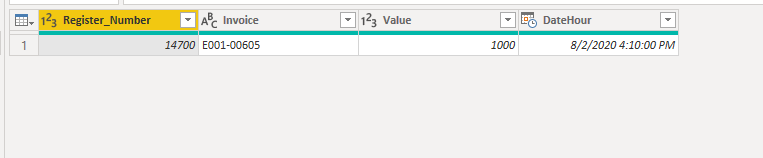
Finally you will see:
Hi @JoaoMS ,
Using a M query as below:
let
Source = Table.FromRows(Json.Document(Binary.Decompress(Binary.FromText("i45WMjQxNTBQ0lFyNTAw1DUwMDMwBXIMDcBiFvoGRvpGBkYGCoYGVkCRWB2QejNM9bqYGswQGsyJscDMyhCoPhYA", BinaryEncoding.Base64), Compression.Deflate)), let _t = ((type text) meta [Serialized.Text = true]) in type table [Register_Number = _t, Invoice = _t, Value = _t, DateHour = _t]),
#"Changed Type" = Table.TransformColumnTypes(Source,{{"Register_Number", Int64.Type}, {"Invoice", type text}, {"Value", Int64.Type}, {"DateHour", type datetime}}),
#"New step" = Table.RemoveColumns(Table.SelectRows(Table.AddColumn(Table.AddColumn(#"Changed Type", "Custom", each List.Max(#"Changed Type"[DateHour])), "Max_Value", each if [DateHour] = [Custom] then 1 else 0), each ([Max_Value] = 1)),{"Custom", "Max_Value"})
in
#"New step"
Finally you will see:
Hi @JoaoMS ,
You can try this code:
let
Source = Table.FromRows(Json.Document(Binary.Decompress(Binary.FromText("i45WMjQxNTBQ0lFyNTAw1DUwMDMwBXIMDcBiFvoGRvpGBkYGCoYGVkCRWB2QejNM9bqYGswQGsyJscDMyhCoPhYA", BinaryEncoding.Base64), Compression.Deflate)), let _t = ((type text) meta [Serialized.Text = true]) in type table [Register_Number = _t, Invoice = _t, Value = _t, DateHour = _t]),
#"Changed Type" = Table.TransformColumnTypes(Source,{{"Register_Number", Int64.Type}, {"Invoice", type text}, {"Value", Int64.Type}, {"DateHour", type datetime}}),
#"Added Custom" = Table.AddColumn(#"Changed Type", "Custom", each List.Max(#"Changed Type"[DateHour])),
#"Added Custom1" = Table.AddColumn(#"Added Custom", "Max_Value", each if [DateHour] = [Custom] then 1 else 0),
#"Filtered Rows" = Table.SelectRows(#"Added Custom1", each ([Max_Value] = 1))
in
#"Filtered Rows"
Ricardo
The Power BI Data Visualization World Championships is back! Get ahead of the game and start preparing now!
Check out the November 2025 Power BI update to learn about new features.
| User | Count |
|---|---|
| 65 | |
| 46 | |
| 43 | |
| 26 | |
| 19 |
| User | Count |
|---|---|
| 198 | |
| 126 | |
| 102 | |
| 68 | |
| 51 |