cancel
Showing results for 
Search instead for 
Did you mean: 

The Power BI Data Visualization World Championships is back! Get ahead of the game and start preparing now! Learn more

Reply
JoaoMS
Helper III
Helper III

Filter rows by last update in Query Editor

Dear, I have the following table where an invoice can have many "Register Numbers":


Register_NumberInvoiceValueDateHour
14500E001-0060510008/02/2020 10:00
14600E001-00605-10008/02/2020 16:00
14700E001-0060510008/02/2020 16:10


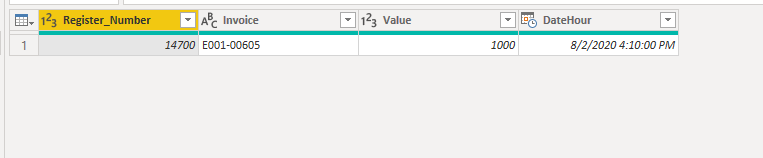
What I want to filter from Query Editor is just the last version of the Registered Invoice based either on the "DateHour" column or the "Register_Number" column.


The output table should be:


Register_NumberInvoiceValueDateHour
14700E001-0060510008/02/2020 16:10


I don't want to use DAX because I'd have to create a new table.


Regards

Joao

2 ACCEPTED SOLUTIONS
camargos88
Community Champion
Community Champion

Hi @JoaoMS ,


You can try this code:


let
Source = Table.FromRows(Json.Document(Binary.Decompress(Binary.FromText("i45WMjQxNTBQ0lFyNTAw1DUwMDMwBXIMDcBiFvoGRvpGBkYGCoYGVkCRWB2QejNM9bqYGswQGsyJscDMyhCoPhYA", BinaryEncoding.Base64), Compression.Deflate)), let _t = ((type text) meta [Serialized.Text = true]) in type table [Register_Number = _t, Invoice = _t, Value = _t, DateHour = _t]),
#"Changed Type" = Table.TransformColumnTypes(Source,{{"Register_Number", Int64.Type}, {"Invoice", type text}, {"Value", Int64.Type}, {"DateHour", type datetime}}),
#"Added Custom" = Table.AddColumn(#"Changed Type", "Custom", each List.Max(#"Changed Type"[DateHour])),
#"Added Custom1" = Table.AddColumn(#"Added Custom", "Max_Value", each if [DateHour] = [Custom] then 1 else 0),
#"Filtered Rows" = Table.SelectRows(#"Added Custom1", each ([Max_Value] = 1))
in
#"Filtered Rows"


Ricardo


Did I answer your question? Mark my post as a solution!

Proud to be a Super User!


View solution in original post

v-kelly-msft
Community Support
Community Support

Hi @JoaoMS ,


Using a M query as below:


let
Source = Table.FromRows(Json.Document(Binary.Decompress(Binary.FromText("i45WMjQxNTBQ0lFyNTAw1DUwMDMwBXIMDcBiFvoGRvpGBkYGCoYGVkCRWB2QejNM9bqYGswQGsyJscDMyhCoPhYA", BinaryEncoding.Base64), Compression.Deflate)), let _t = ((type text) meta [Serialized.Text = true]) in type table [Register_Number = _t, Invoice = _t, Value = _t, DateHour = _t]),
#"Changed Type" = Table.TransformColumnTypes(Source,{{"Register_Number", Int64.Type}, {"Invoice", type text}, {"Value", Int64.Type}, {"DateHour", type datetime}}),
#"New step" = Table.RemoveColumns(Table.SelectRows(Table.AddColumn(Table.AddColumn(#"Changed Type", "Custom", each List.Max(#"Changed Type"[DateHour])), "Max_Value", each if [DateHour] = [Custom] then 1 else 0), each ([Max_Value] = 1)),{"Custom", "Max_Value"})
in
#"New step"


Finally you will see:
 

Annotation 2020-03-24 140446.png

Best Regards,
Kelly
Did I answer your question? Mark my post as a solution!


View solution in original post

2 REPLIES 2
v-kelly-msft
Community Support
Community Support

Hi @JoaoMS ,


Using a M query as below:


let
Source = Table.FromRows(Json.Document(Binary.Decompress(Binary.FromText("i45WMjQxNTBQ0lFyNTAw1DUwMDMwBXIMDcBiFvoGRvpGBkYGCoYGVkCRWB2QejNM9bqYGswQGsyJscDMyhCoPhYA", BinaryEncoding.Base64), Compression.Deflate)), let _t = ((type text) meta [Serialized.Text = true]) in type table [Register_Number = _t, Invoice = _t, Value = _t, DateHour = _t]),
#"Changed Type" = Table.TransformColumnTypes(Source,{{"Register_Number", Int64.Type}, {"Invoice", type text}, {"Value", Int64.Type}, {"DateHour", type datetime}}),
#"New step" = Table.RemoveColumns(Table.SelectRows(Table.AddColumn(Table.AddColumn(#"Changed Type", "Custom", each List.Max(#"Changed Type"[DateHour])), "Max_Value", each if [DateHour] = [Custom] then 1 else 0), each ([Max_Value] = 1)),{"Custom", "Max_Value"})
in
#"New step"


Finally you will see:


Annotation 2020-03-24 140446.png

Best Regards,
Kelly
Did I answer your question? Mark my post as a solution!


camargos88
Community Champion
Community Champion

Hi @JoaoMS ,


You can try this code:


let
Source = Table.FromRows(Json.Document(Binary.Decompress(Binary.FromText("i45WMjQxNTBQ0lFyNTAw1DUwMDMwBXIMDcBiFvoGRvpGBkYGCoYGVkCRWB2QejNM9bqYGswQGsyJscDMyhCoPhYA", BinaryEncoding.Base64), Compression.Deflate)), let _t = ((type text) meta [Serialized.Text = true]) in type table [Register_Number = _t, Invoice = _t, Value = _t, DateHour = _t]),
#"Changed Type" = Table.TransformColumnTypes(Source,{{"Register_Number", Int64.Type}, {"Invoice", type text}, {"Value", Int64.Type}, {"DateHour", type datetime}}),
#"Added Custom" = Table.AddColumn(#"Changed Type", "Custom", each List.Max(#"Changed Type"[DateHour])),
#"Added Custom1" = Table.AddColumn(#"Added Custom", "Max_Value", each if [DateHour] = [Custom] then 1 else 0),
#"Filtered Rows" = Table.SelectRows(#"Added Custom1", each ([Max_Value] = 1))
in
#"Filtered Rows"


Ricardo


Did I answer your question? Mark my post as a solution!

Proud to be a Super User!


Helpful resources

Announcements
November Power BI Update Carousel

Power BI Monthly Update - November 2025

Check out the November 2025 Power BI update to learn about new features.

Fabric Data Days Carousel

Fabric Data Days

Advance your Data & AI career with 50 days of live learning, contests, hands-on challenges, study groups & certifications and more!

FabCon Atlanta 2026 carousel

FabCon Atlanta 2026

Join us at FabCon Atlanta, March 16-20, for the ultimate Fabric, Power BI, AI and SQL community-led event. Save $200 with code FABCOMM.