cancel
Showing results for 
Search instead for 
Did you mean: 

The Power BI Data Visualization World Championships is back! Get ahead of the game and start preparing now! Learn more

Reply
Anonymous
Not applicable

Filter pane on dashboard page

Hello, 


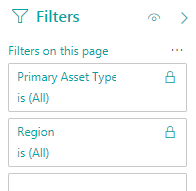
I am trying to install my filter pane into my dashboard. I have the filters off to the right within the filters, visualizations, and fields tab. I want to have a filter for my graphs installed into the actual dashboard itself where I would be able to access it without going into the visualizationst tab each time. I installed a picture of what I want to be filtered into my graph. 

 Filter.PNG

2 ACCEPTED SOLUTIONS
jdbuchanan71
Super User
Super User

@Anonymous 

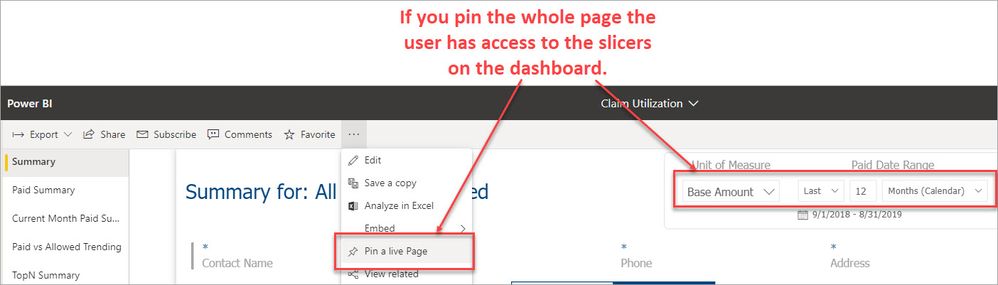
There isn't a way to show the filter pane on a dashboard currently.  The best I can think of is to have a dashboard copy of the report with the filters displayed on the page.  Then, if you pin the live report, the user has access to the slicers on the dashboard.

PinLive.jpg

View solution in original post

Icey
Community Support
Community Support

Hi @Anonymous ,


Something you should know:

1. Filter pane is not support for dahboards.

2. It's not available to pin slicers to dashboards.

3. The pinned visual displayed on dashboard won't be filtered by the slicer selection displayed on source report page.

4. As a workaround, you could pin entire report page which contains slicer to your dashboard by selecting "Pin Live Page". This way, you can use the slicer to filter all tiles within the same report page.


Best Regards,

Icey


If this post helps, then please consider Accept it as the solution to help the other members find it more quickly.


View solution in original post

3 REPLIES 3
Icey
Community Support
Community Support

Hi @Anonymous ,


Is this problem sloved?
 
If it is sloved, could you kindly accept it as a solution to close this case?  
 
If not, please let me know.  
 
Best Regards
Icey
Icey
Community Support
Community Support

Hi @Anonymous ,


Something you should know:

1. Filter pane is not support for dahboards.

2. It's not available to pin slicers to dashboards.

3. The pinned visual displayed on dashboard won't be filtered by the slicer selection displayed on source report page.

4. As a workaround, you could pin entire report page which contains slicer to your dashboard by selecting "Pin Live Page". This way, you can use the slicer to filter all tiles within the same report page.


Best Regards,

Icey


If this post helps, then please consider Accept it as the solution to help the other members find it more quickly.


jdbuchanan71
Super User
Super User

@Anonymous 

There isn't a way to show the filter pane on a dashboard currently.  The best I can think of is to have a dashboard copy of the report with the filters displayed on the page.  Then, if you pin the live report, the user has access to the slicers on the dashboard.

PinLive.jpg

Helpful resources

Announcements
November Power BI Update Carousel

Power BI Monthly Update - November 2025

Check out the November 2025 Power BI update to learn about new features.

Fabric Data Days Carousel

Fabric Data Days

Advance your Data & AI career with 50 days of live learning, contests, hands-on challenges, study groups & certifications and more!

FabCon Atlanta 2026 carousel

FabCon Atlanta 2026

Join us at FabCon Atlanta, March 16-20, for the ultimate Fabric, Power BI, AI and SQL community-led event. Save $200 with code FABCOMM.

Top Kudoed Authors