cancel
Showing results for 
Search instead for 
Did you mean: 

The Power BI Data Visualization World Championships is back! Get ahead of the game and start preparing now! Learn more

Reply
Anonymous
Not applicable

Filter no data

Hi There,

I have a schedule of doing antibody tests every workday of the week for all employees,

Schedule test once a week and starts on Monday until Friday.

I want to filter who hasn't had an antibody test every week.


I have 3 tables (calendar, user,  and user test)

akhmad_danial_0-1641285939159.png

Does anyone have an idea?


1 ACCEPTED SOLUTION
v-zhangti
Community Support
Community Support

Hi, @Anonymous 


You can try the following methods.

Measure:

Remarks = IF(countrows(UserTest)<>BLANK(),"Yes","No")
Measure = IF([Remarks]="Yes",BLANK(),"RED")

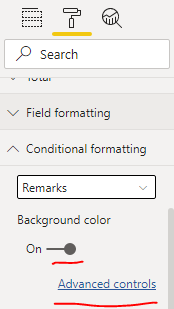
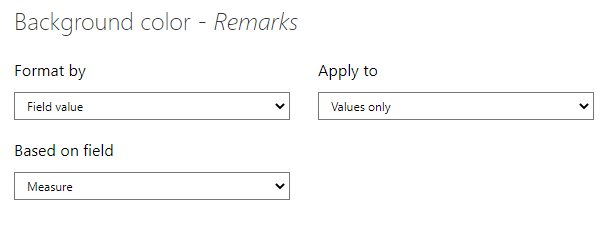
Set the background color to Measure.

vzhangti_1-1641536397172.pngvzhangti_2-1641536418658.png

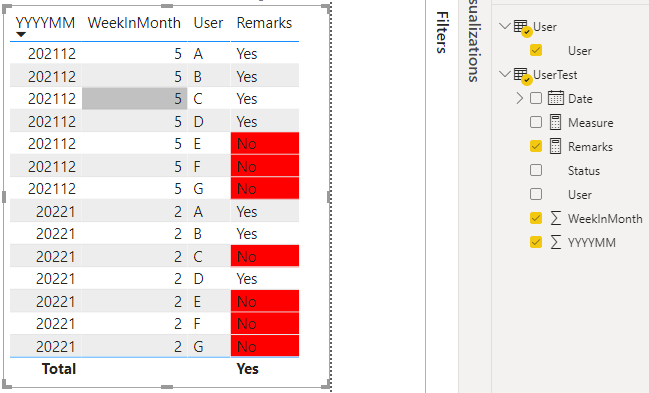
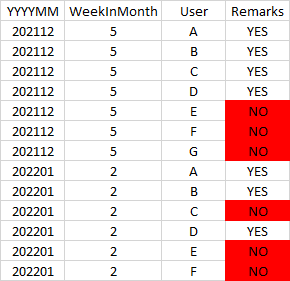
The results are shown in the figure.

vzhangti_3-1641536537777.png


Best Regards,

Community Support Team _Charlotte

If this post helps, then please consider Accept it as the solution to help the other members find it more quickly.

View solution in original post

5 REPLIES 5
v-zhangti
Community Support
Community Support

Hi, @Anonymous 


You can try the following methods.

Measure:

Remarks = IF(countrows(UserTest)<>BLANK(),"Yes","No")
Measure = IF([Remarks]="Yes",BLANK(),"RED")

Set the background color to Measure.

vzhangti_1-1641536397172.pngvzhangti_2-1641536418658.png

The results are shown in the figure.

vzhangti_3-1641536537777.png


Best Regards,

Community Support Team _Charlotte

If this post helps, then please consider Accept it as the solution to help the other members find it more quickly.

Anonymous
Not applicable

Hi @v-zhangti ,

Thank you very much, It is going to take me some time to understand how this works. I appreciate this support.

Anonymous
Not applicable

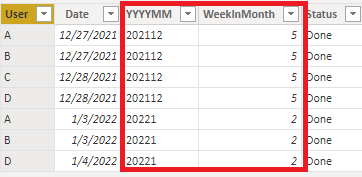
I added 2 columns in UserTest Table, to make it easier to find usernames that haven't been tested.

akhmad_danial_0-1641358463707.png


But, how do I achieve results like this,

akhmad_danial_1-1641358719188.png

Thanks for any help you can give


Anonymous
Not applicable

@amitchandak,

thank you for the fast response.

what do you mean "measure not tested"?  

amitchandak
Super User
Super User

@Anonymous , Assuming you have table test and use 


Create a measure on test.

tested = countrows(test)


measure not tested

countx(filter(values(User[User]) , if(isblank([tested]),[User], blank() ) )


Share with Power BI Enthusiasts: Full Power BI Video (20 Hours) YouTube
Microsoft Fabric Series 60+ Videos YouTube
Microsoft Fabric Hindi End to End YouTube

Helpful resources

Announcements
Power BI DataViz World Championships

Power BI Dataviz World Championships

The Power BI Data Visualization World Championships is back! Get ahead of the game and start preparing now!

December 2025 Power BI Update Carousel

Power BI Monthly Update - December 2025

Check out the December 2025 Power BI Holiday Recap!

FabCon Atlanta 2026 carousel

FabCon Atlanta 2026

Join us at FabCon Atlanta, March 16-20, for the ultimate Fabric, Power BI, AI and SQL community-led event. Save $200 with code FABCOMM.