FabCon is coming to Atlanta
Join us at FabCon Atlanta from March 16 - 20, 2026, for the ultimate Fabric, Power BI, AI and SQL community-led event. Save $200 with code FABCOMM.
Register now!- Power BI forums
- Get Help with Power BI
- Desktop
- Service
- Report Server
- Power Query
- Mobile Apps
- Developer
- DAX Commands and Tips
- Custom Visuals Development Discussion
- Health and Life Sciences
- Power BI Spanish forums
- Translated Spanish Desktop
- Training and Consulting
- Instructor Led Training
- Dashboard in a Day for Women, by Women
- Galleries
- Data Stories Gallery
- Themes Gallery
- Contests Gallery
- QuickViz Gallery
- Quick Measures Gallery
- Visual Calculations Gallery
- Notebook Gallery
- Translytical Task Flow Gallery
- TMDL Gallery
- R Script Showcase
- Webinars and Video Gallery
- Ideas
- Custom Visuals Ideas (read-only)
- Issues
- Issues
- Events
- Upcoming Events
The Power BI Data Visualization World Championships is back! It's time to submit your entry. Live now!
- Power BI forums
- Forums
- Get Help with Power BI
- Desktop
- Re: Filter no data
- Subscribe to RSS Feed
- Mark Topic as New
- Mark Topic as Read
- Float this Topic for Current User
- Bookmark
- Subscribe
- Printer Friendly Page

- Mark as New
- Bookmark
- Subscribe
- Mute
- Subscribe to RSS Feed
- Permalink
- Report Inappropriate Content
Filter no data
Hi There,
I have a schedule of doing antibody tests every workday of the week for all employees,
Schedule test once a week and starts on Monday until Friday.
I want to filter who hasn't had an antibody test every week.
I have 3 tables (calendar, user, and user test)

Does anyone have an idea?
Solved! Go to Solution.


- Mark as New
- Bookmark
- Subscribe
- Mute
- Subscribe to RSS Feed
- Permalink
- Report Inappropriate Content
Hi, @Anonymous
You can try the following methods.
Measure:
Remarks = IF(countrows(UserTest)<>BLANK(),"Yes","No")Measure = IF([Remarks]="Yes",BLANK(),"RED")Set the background color to Measure.
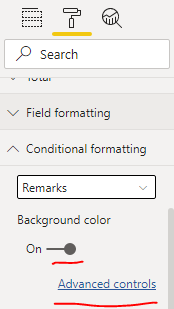
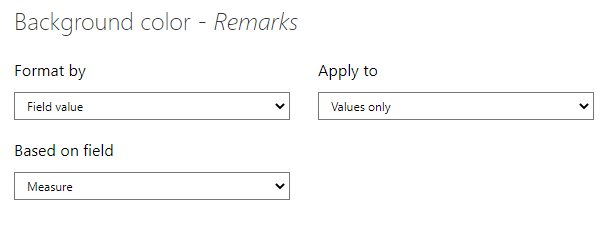
The results are shown in the figure.
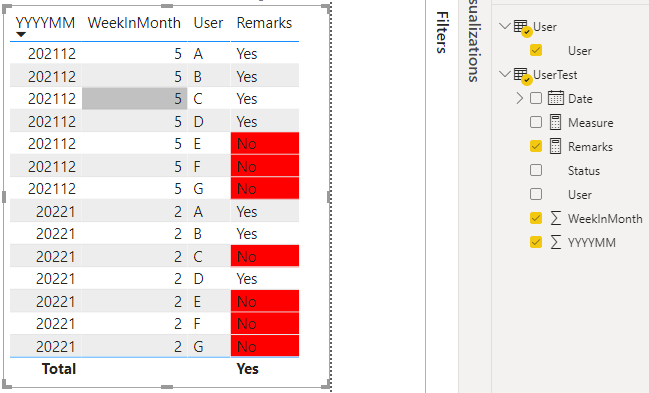
Best Regards,
Community Support Team _Charlotte
If this post helps, then please consider Accept it as the solution to help the other members find it more quickly.
- Mark as New
- Bookmark
- Subscribe
- Mute
- Subscribe to RSS Feed
- Permalink
- Report Inappropriate Content
Hi, @Anonymous
You can try the following methods.
Measure:
Remarks = IF(countrows(UserTest)<>BLANK(),"Yes","No")Measure = IF([Remarks]="Yes",BLANK(),"RED")Set the background color to Measure.
The results are shown in the figure.
Best Regards,
Community Support Team _Charlotte
If this post helps, then please consider Accept it as the solution to help the other members find it more quickly.
- Mark as New
- Bookmark
- Subscribe
- Mute
- Subscribe to RSS Feed
- Permalink
- Report Inappropriate Content
Hi @v-zhangti ,
Thank you very much, It is going to take me some time to understand how this works. I appreciate this support.
- Mark as New
- Bookmark
- Subscribe
- Mute
- Subscribe to RSS Feed
- Permalink
- Report Inappropriate Content
I added 2 columns in UserTest Table, to make it easier to find usernames that haven't been tested.
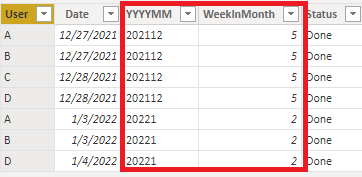
But, how do I achieve results like this,
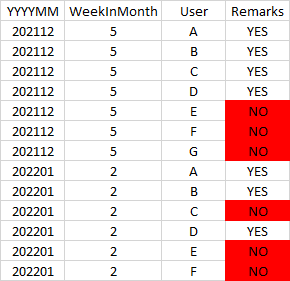
Thanks for any help you can give
- Mark as New
- Bookmark
- Subscribe
- Mute
- Subscribe to RSS Feed
- Permalink
- Report Inappropriate Content


- Mark as New
- Bookmark
- Subscribe
- Mute
- Subscribe to RSS Feed
- Permalink
- Report Inappropriate Content
@Anonymous , Assuming you have table test and use
Create a measure on test.
tested = countrows(test)
measure not tested
countx(filter(values(User[User]) , if(isblank([tested]),[User], blank() ) )
Helpful resources


| User | Count |
|---|---|
| 53 | |
| 40 | |
| 35 | |
| 24 | |
| 22 |


| User | Count |
|---|---|
| 134 | |
| 107 | |
| 57 | |
| 43 | |
| 38 |


