cancel
Showing results for 
Search instead for 
Did you mean: 

Did you hear? There's a new SQL AI Developer certification (DP-800). Start preparing now and be one of the first to get certified. Register now

Reply
wingsted93
Frequent Visitor

Filter line chart without changing data

I have made a line chart to show active users over time. The values stems from a measure which is summing up the number of registrations minus the number of cancellations:

running total of active users =
CALCULATE(
    [Active users],
    FILTER(
        ALLSELECTED('Kalender'[Date]),
        ISONORAFTER('Kalender'[Date], MAX(Kalender[Date]), DESC)
    )
)


The 'Active users' measure is simply adding the number of regristrations and subtracting the number of cancellations. And the values i use in my line chart is, as the name implies, a running total of that number. 


My line chart is working and showing data on a monthly basis. However, I want to only show data for 6 months back. A simple filter on the chart will change the values. I need a way to filter the X axis without changing data. 

1 ACCEPTED SOLUTION

Hi @wingsted93 ,


In your measure, replace ALLSELECTED with ALL in that case and check if that works.


Thanks,

Pragati

Best Regards,

Pragati Jain


MVP logo


LinkedIn | Twitter | Blog YouTube 

Did I answer your question? Mark my post as a solution! This will help others on the forum!

Appreciate your Kudos!!

Proud to be a Super User!!

View solution in original post

3 REPLIES 3
Pragati11
Super User
Super User

Hi @wingsted93 ,


Click on your line chart and got to visual level filters and apply filter on the column that is used on the x-axis.


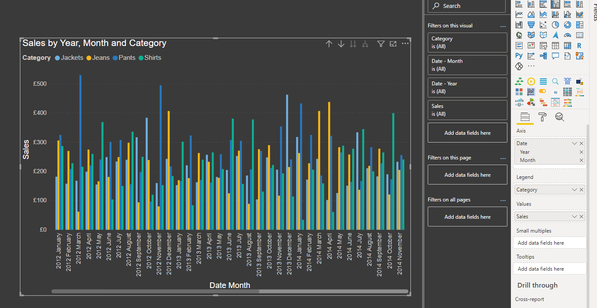
Consider the following visual where I have got SALES by MONTH-YEAR:

Pragati11_0-1611759122552.png

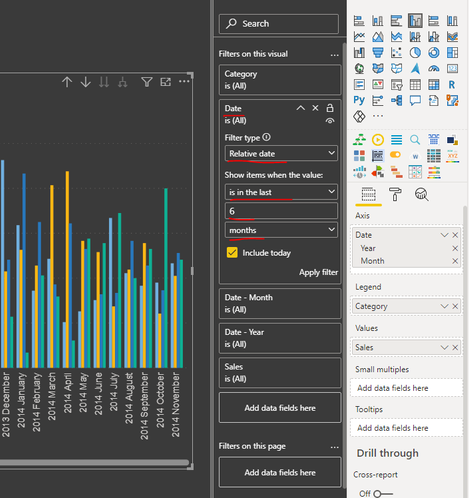
Now suppose if I just want data to be shown for last 6 months, then apply visual level filter on Date column using Relative Filtering option:

Pragati11_1-1611759222545.png


Thanks,

Pragati

Best Regards,

Pragati Jain


MVP logo


LinkedIn | Twitter | Blog YouTube 

Did I answer your question? Mark my post as a solution! This will help others on the forum!

Appreciate your Kudos!!

Proud to be a Super User!!

Hi @Pragati11 ,

I have aready tried that, but the values are only true if the calculations are made on the entire dataset, and when i filter the way you propose, i get wrong values on the line chart, as it calculates the difference in user registrations vs user cancellations. I need a way to filter without the measure "knowing" about it.

Hi @wingsted93 ,


In your measure, replace ALLSELECTED with ALL in that case and check if that works.


Thanks,

Pragati

Best Regards,

Pragati Jain


MVP logo


LinkedIn | Twitter | Blog YouTube 

Did I answer your question? Mark my post as a solution! This will help others on the forum!

Appreciate your Kudos!!

Proud to be a Super User!!

Helpful resources

Announcements
April Power BI Update Carousel

Power BI Monthly Update - April 2026

Check out the April 2026 Power BI update to learn about new features.

Fabric SQL PBI Data Days

Data Days 2026 coming soon!

Sign up to receive a private message when registration opens and key events begin.

New to Fabric survey Carousel

New to Fabric Survey

If you have recently started exploring Fabric, we'd love to hear how it's going. Your feedback can help with product improvements.

Power BI DataViz World Championships carousel

Power BI DataViz World Championships - June 2026

A new Power BI DataViz World Championship is coming this June! Don't miss out on submitting your entry.