Join us at FabCon Atlanta from March 16 - 20, 2026, for the ultimate Fabric, Power BI, AI and SQL community-led event. Save $200 with code FABCOMM.
Register now!The Power BI Data Visualization World Championships is back! It's time to submit your entry. Live now!
Hi everyone,
I have been stuck in a situation, and I appreciate any help.
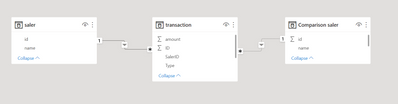
I have a fact transaction and a DimSaler table. I want to make a comparison between 2 people in my organization, so I make another DimSaler called Comparison DimSaler to calculate the difference between 2 people. This is a sample of my data model.
This is a sample of the matrix
I have 2 slicers to select saler for the matrixs. The first matrix shows sale information of a saler, and the second martix shows other saler. The third table shows the difference sale amount between 2 people. Now, I want to filter on the third table to take only the intersection between matrix 1 and matrix 2, so the third matrix should only contain book, shampoo, and shoes.
I can not post my sample pbix file to this post, so this is a link I refered to created the first 2 matrix. https://www.youtube.com/watch?v=hu_fOtZDJwU
Thank you so much for your help.
@chinh_ho Maybe:
Measure =
VAR __Table1 = DISTINCT(SELECTCOLUMNS(FILTER('Transactions',[ID] = 1),"__Type",[Type]))
VAR __Table2 = DISTINCT(SELECTCOLUMNS(FILTER('Transactions',[ID] = 2),"__Type",[Type]))
VAR __Common = INTERSECT(__Table1, __Table2)
RETURN
IF(MAX('Transactions'[Type]) IN __Common, [change amount], BLANK())
Hi @Greg_Deckler ,
Thank you so much for your quick response. The Dax calculation did not work for me. I think because the relationship between Transaction and ComparisonSaler is inactive. (I need to make it inactive to filter it on the second table). In addition, I want the Dax dynamic when I select the saler on the slicer. Please help me recalculate it.
The Power BI Data Visualization World Championships is back! It's time to submit your entry.
Check out the January 2026 Power BI update to learn about new features.
| User | Count |
|---|---|
| 61 | |
| 42 | |
| 30 | |
| 26 | |
| 23 |
| User | Count |
|---|---|
| 134 | |
| 113 | |
| 58 | |
| 39 | |
| 35 |