Join us at FabCon Atlanta from March 16 - 20, 2026, for the ultimate Fabric, Power BI, AI and SQL community-led event. Save $200 with code FABCOMM.
Register now!View all the Fabric Data Days sessions on demand. View schedule
Hello!
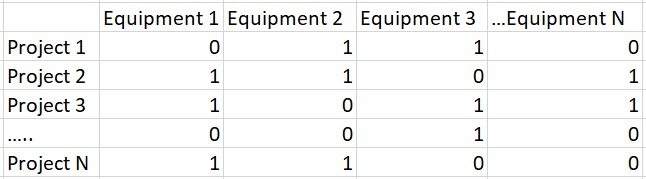
I´m trying to create a new slicer for a series of dummy variables. My data is something like this:
My idea is to have one slicer that allow users to select the equipments that they want, then the dashboard should show all projects that have "1" in the equipments selected. Is it possible to do so or do I need to create one slicer for each Equipment and indicate to select "1" option in each slicer?
Thanks in advance!
Pedro
Solved! Go to Solution.
Hi @Anonymous
1. Created a table as your requested.
2. Unpivot the table:
let
Source = Table.FromRows(Json.Document(Binary.Decompress(Binary.FromText("i45WCijKz0pNLjFU0lEyAGJDKDZQitWBSxqhSIBoJEljFAk0nSZQCYTRsbEA", BinaryEncoding.Base64), Compression.Deflate)), let _t = ((type text) meta [Serialized.Text = true]) in type table [ProjectID = _t, Equipment1 = _t, Equipment2 = _t, Equipment3 = _t, Equipment4 = _t]),
#"Changed Type" = Table.TransformColumnTypes(Source,{{"ProjectID", type text}, {"Equipment1", Int64.Type}, {"Equipment2", Int64.Type}, {"Equipment3", Int64.Type}, {"Equipment4", Int64.Type}}),
#"Unpivoted Columns" = Table.UnpivotOtherColumns(#"Changed Type", {"ProjectID"}, "Attribute", "Value")
in
#"Unpivoted Columns"
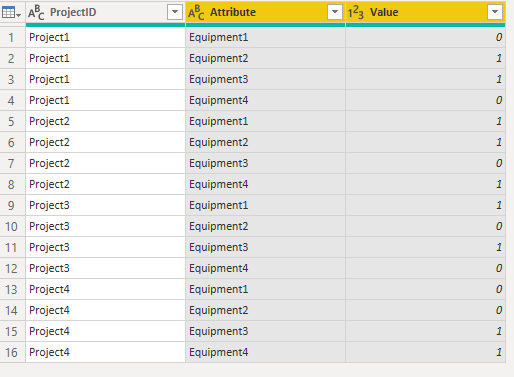
3. Filter the value is 1 and set the attributes as slicer:
Hi @Anonymous
1. Created a table as your requested.
2. Unpivot the table:
let
Source = Table.FromRows(Json.Document(Binary.Decompress(Binary.FromText("i45WCijKz0pNLjFU0lEyAGJDKDZQitWBSxqhSIBoJEljFAk0nSZQCYTRsbEA", BinaryEncoding.Base64), Compression.Deflate)), let _t = ((type text) meta [Serialized.Text = true]) in type table [ProjectID = _t, Equipment1 = _t, Equipment2 = _t, Equipment3 = _t, Equipment4 = _t]),
#"Changed Type" = Table.TransformColumnTypes(Source,{{"ProjectID", type text}, {"Equipment1", Int64.Type}, {"Equipment2", Int64.Type}, {"Equipment3", Int64.Type}, {"Equipment4", Int64.Type}}),
#"Unpivoted Columns" = Table.UnpivotOtherColumns(#"Changed Type", {"ProjectID"}, "Attribute", "Value")
in
#"Unpivoted Columns"
3. Filter the value is 1 and set the attributes as slicer:
You can't really do what you want with the data structured the way it is. I would suggest using an unpivot operation in your query to convert the equipment columns into rows, then filter to only include the rows with 1's.
So the end result would be:
Project 1 Equipment 2 1
Project 1 Equipment 3 1
Project 2 Equipment 1 1
Project 2 Equipment 2 1
...
Then you can have a single slicer on the Equipment column.
Check out the November 2025 Power BI update to learn about new features.
Advance your Data & AI career with 50 days of live learning, contests, hands-on challenges, study groups & certifications and more!