Don't miss your chance to take exam DP-600 or DP-700 on us!
Request nowLearn from the best! Meet the four finalists headed to the FINALS of the Power BI Dataviz World Championships! Register now
Hello!
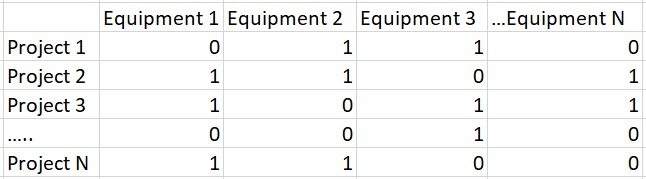
I´m trying to create a new slicer for a series of dummy variables. My data is something like this:
My idea is to have one slicer that allow users to select the equipments that they want, then the dashboard should show all projects that have "1" in the equipments selected. Is it possible to do so or do I need to create one slicer for each Equipment and indicate to select "1" option in each slicer?
Thanks in advance!
Pedro
Solved! Go to Solution.
Hi @Anonymous
1. Created a table as your requested.
2. Unpivot the table:
let
Source = Table.FromRows(Json.Document(Binary.Decompress(Binary.FromText("i45WCijKz0pNLjFU0lEyAGJDKDZQitWBSxqhSIBoJEljFAk0nSZQCYTRsbEA", BinaryEncoding.Base64), Compression.Deflate)), let _t = ((type text) meta [Serialized.Text = true]) in type table [ProjectID = _t, Equipment1 = _t, Equipment2 = _t, Equipment3 = _t, Equipment4 = _t]),
#"Changed Type" = Table.TransformColumnTypes(Source,{{"ProjectID", type text}, {"Equipment1", Int64.Type}, {"Equipment2", Int64.Type}, {"Equipment3", Int64.Type}, {"Equipment4", Int64.Type}}),
#"Unpivoted Columns" = Table.UnpivotOtherColumns(#"Changed Type", {"ProjectID"}, "Attribute", "Value")
in
#"Unpivoted Columns"
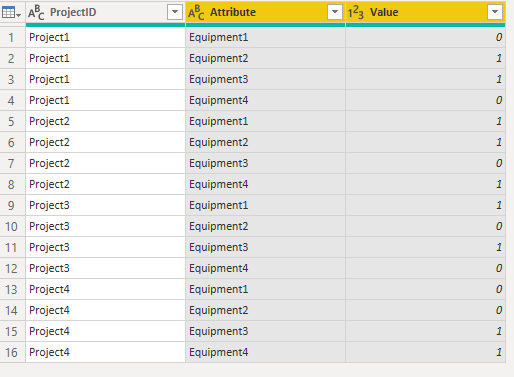
3. Filter the value is 1 and set the attributes as slicer:
Hi @Anonymous
1. Created a table as your requested.
2. Unpivot the table:
let
Source = Table.FromRows(Json.Document(Binary.Decompress(Binary.FromText("i45WCijKz0pNLjFU0lEyAGJDKDZQitWBSxqhSIBoJEljFAk0nSZQCYTRsbEA", BinaryEncoding.Base64), Compression.Deflate)), let _t = ((type text) meta [Serialized.Text = true]) in type table [ProjectID = _t, Equipment1 = _t, Equipment2 = _t, Equipment3 = _t, Equipment4 = _t]),
#"Changed Type" = Table.TransformColumnTypes(Source,{{"ProjectID", type text}, {"Equipment1", Int64.Type}, {"Equipment2", Int64.Type}, {"Equipment3", Int64.Type}, {"Equipment4", Int64.Type}}),
#"Unpivoted Columns" = Table.UnpivotOtherColumns(#"Changed Type", {"ProjectID"}, "Attribute", "Value")
in
#"Unpivoted Columns"
3. Filter the value is 1 and set the attributes as slicer:
You can't really do what you want with the data structured the way it is. I would suggest using an unpivot operation in your query to convert the equipment columns into rows, then filter to only include the rows with 1's.
So the end result would be:
Project 1 Equipment 2 1
Project 1 Equipment 3 1
Project 2 Equipment 1 1
Project 2 Equipment 2 1
...
Then you can have a single slicer on the Equipment column.
Share feedback directly with Fabric product managers, participate in targeted research studies and influence the Fabric roadmap.
Check out the February 2026 Power BI update to learn about new features.
| User | Count |
|---|---|
| 54 | |
| 47 | |
| 38 | |
| 16 | |
| 15 |
| User | Count |
|---|---|
| 83 | |
| 71 | |
| 38 | |
| 28 | |
| 25 |