cancel
Showing results for 
Search instead for 
Did you mean: 

A new Data Days event is coming soon! This time we’re going bigger than ever. Fabric, Power BI, SQL, AI and more. Don't miss out.

Reply
Daiov97
Regular Visitor

Filter dates based on other value

I'm new to power bi and wondering if there's a way to make this work:


I have a table with dates, coordinates and another column with a value in it.


I want to show all the locations on that specific day. When I try to filter the column with the value, the visualisation "route map" only shows the specific location of the filtered value.


Is there a way to show ALL the locations on that day?

3 REPLIES 3
Anonymous
Not applicable

Hi @Daiov97,


If you make a slicer with your "Dates" column as value, you can filter with dates. If you select a single day through the slicer it will display all data from that day. All visuals will interactively only show data from that day, so map visuals will show all locations from that day like you wanted.


Please let me know if you need more help.


Regards,

L.Meijdam

Thanks for your response.


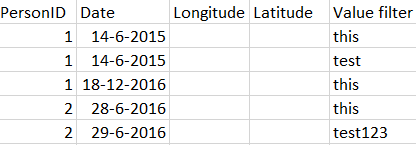
I already figured out how to use a date filter. My problem is more complex. I created a table to show my issue:


test.PNG


What I tried is filtering all the lines with the value "this". When I do this in the table above, it will show me 3 lines.


I want to show all the locations on that day and not only the one where the value is 'this'. I want it to show the second line (with test as value) as well, because that date is the same as the one above.


When i filter on the dates manually, Power BI will pick all the dates from all the persons. If personID 1 has made a trip with the value 'this' on a specific day, the whole day has to show up in my visual.


I don't know if it's possible, but I hope I made my issue clear. It's pretty hard for me to explain what I want.


Hi @Daiov97,


This is not achievable. Once you apply a slicer filter to table visual (e.g this), the current context only contains three rows (line 1, 3, 4). It is not possible to access other rows which has been excluded.


Regards,
Yuliana Gu


Community Support Team _ Yuliana Gu
If this post helps, then please consider Accept it as the solution to help the other members find it more quickly.

Helpful resources

Announcements
May Power BI Update Carousel

Power BI Monthly Update - May 2026

Check out the May 2026 Power BI update to learn about new features.

Fabric SQL PBI Data Days

Data Days 2026 coming soon!

Sign up to receive a private message when registration opens and key events begin.

New to Fabric survey Carousel

New to Fabric Survey

If you have recently started exploring Fabric, we'd love to hear how it's going. Your feedback can help with product improvements.

Power BI DataViz World Championships carousel

Power BI DataViz World Championships - June 2026

A new Power BI DataViz World Championship is coming this June! Don't miss out on submitting your entry.