
Don't miss your chance to take the Fabric Data Engineer (DP-600) exam for FREE! Find out how by attending the DP-600 session on April 23rd (pacific time), live or on-demand.
Learn moreNext up in the FabCon + SQLCon recap series: The roadmap for Microsoft SQL and Maximizing Developer experiences in Fabric. All sessions are available on-demand after the live show. Register now
i have a year, month & week slicer. Whenever I filter year/month slicer the value doesn't update in week slicer dynamically and needs to changed manually. I want week slicer selected value to update dynamically based on month/year selected
Hi @Anonymous
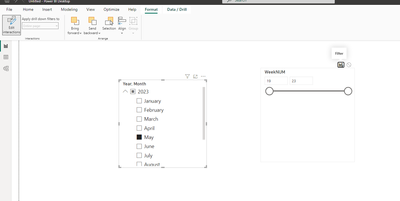
As @Kishore_KVN mentioned, you can click the Year&Month slicer, then set the 'Edit interaction' at the Format, then click the 'filter' icon on weeknum slicer.
Then it will work, if it cannot change, please check that if your year&month column and the weeknum column are in the same table, and check if the relationship of the tables is right.
Best Regards!
Yolo Zhu
If this post helps, then please consider Accept it as the solution to help the other members find it more quickly.
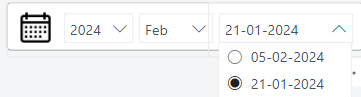
interation are set to filter. I have used dropdown slicer to show the date where the selected value doesn't get updated automatically on changing the selection in month or year. also all are present in same table
Select Year slicer, click on Format at top, select edit relationship. Then select filter option among available options on top of week slicer. Repeat the same with Month slicer as well.
If this post helps, then please consider accepting it as the solution to help other members find it more quickly. Thank You!!
If you have recently started exploring Fabric, we'd love to hear how it's going. Your feedback can help with product improvements.
A new Power BI DataViz World Championship is coming this June! Don't miss out on submitting your entry.
| User | Count |
|---|---|
| 45 | |
| 43 | |
| 39 | |
| 19 | |
| 15 |
| User | Count |
|---|---|
| 67 | |
| 66 | |
| 31 | |
| 28 | |
| 24 |