
This time we’re going bigger than ever. Fabric, Power BI, SQL, AI and more. We're covering it all. You won't want to miss it.
Learn moreLevel up your Power BI skills this month - build one visual each week and tell better stories with data! Get started
I have a table for the year 2020. I have a worksheet for each month. I created a report based out of Jan worksheet. Now I added "Feb" data to excel worksheet and when I import the file, it reads the worksheet as Feb. What i want to do is build report and use month to filter and do it for entire year. The coumns on each worksheet is the same. Can I combine the data in the report and need be can I filter by month?
Thanks
~ Nita
Solved! Go to Solution.
@Anonymous
Bring them as seperate queries but append them as below.
Before appending them, make sure you have a date column which give you the month.
If it helps, mark it as a solution
Kudos are nice too
@Anonymous
Bring them as seperate queries but append them as below.
Before appending them, make sure you have a date column which give you the month.
If it helps, mark it as a solution
Kudos are nice too
Can I add a column to table in BI and assign date value to it?
@Anonymous
Ofcourse you can. There are tons of things we could do with Power BI.
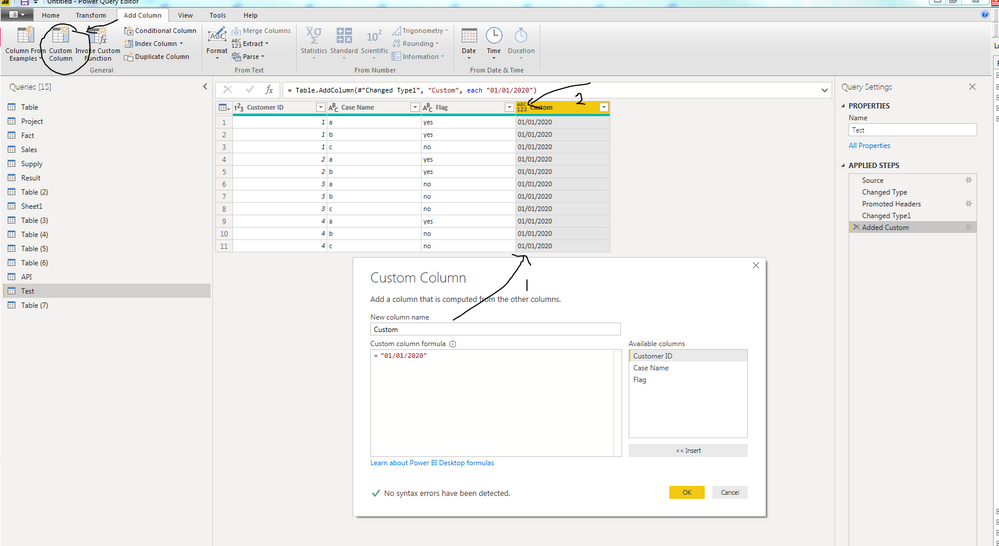
The image shows a Query Editor window. Click on Add Columns and Custom Column. You could either type in ="JAN" or some arbitrary date for each month. Click on the 2nd arrow and change the data type to Date. Do these for each sheet before you append them.
If it helps, mark it as a solution
Kudos are nice too
Check out the April 2026 Power BI update to learn about new features.
Sign up to receive a private message when registration opens and key events begin.
If you have recently started exploring Fabric, we'd love to hear how it's going. Your feedback can help with product improvements.
| User | Count |
|---|---|
| 38 | |
| 28 | |
| 27 | |
| 22 | |
| 18 |
| User | Count |
|---|---|
| 67 | |
| 37 | |
| 32 | |
| 26 | |
| 25 |