
Join us at FabCon Atlanta from March 16 - 20, 2026, for the ultimate Fabric, Power BI, AI and SQL community-led event. Save $200 with code FABCOMM.
Register now!Learn from the best! Meet the four finalists headed to the FINALS of the Power BI Dataviz World Championships! Register now
I have a table for the year 2020. I have a worksheet for each month. I created a report based out of Jan worksheet. Now I added "Feb" data to excel worksheet and when I import the file, it reads the worksheet as Feb. What i want to do is build report and use month to filter and do it for entire year. The coumns on each worksheet is the same. Can I combine the data in the report and need be can I filter by month?
Thanks
~ Nita
Solved! Go to Solution.
@Anonymous
Bring them as seperate queries but append them as below.
Before appending them, make sure you have a date column which give you the month.
If it helps, mark it as a solution
Kudos are nice too
@Anonymous
Bring them as seperate queries but append them as below.
Before appending them, make sure you have a date column which give you the month.
If it helps, mark it as a solution
Kudos are nice too
Can I add a column to table in BI and assign date value to it?
@Anonymous
Ofcourse you can. There are tons of things we could do with Power BI.
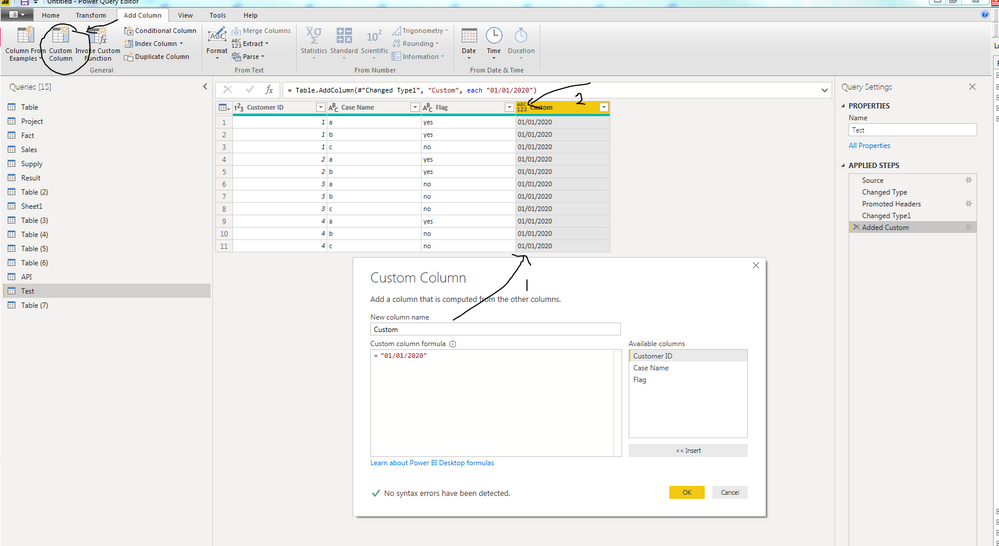
The image shows a Query Editor window. Click on Add Columns and Custom Column. You could either type in ="JAN" or some arbitrary date for each month. Click on the 2nd arrow and change the data type to Date. Do these for each sheet before you append them.
If it helps, mark it as a solution
Kudos are nice too
Share feedback directly with Fabric product managers, participate in targeted research studies and influence the Fabric roadmap.
Check out the February 2026 Power BI update to learn about new features.
| User | Count |
|---|---|
| 53 | |
| 51 | |
| 39 | |
| 15 | |
| 14 |
| User | Count |
|---|---|
| 94 | |
| 81 | |
| 34 | |
| 29 | |
| 25 |