Join us at FabCon Atlanta from March 16 - 20, 2026, for the ultimate Fabric, Power BI, AI and SQL community-led event. Save $200 with code FABCOMM.
Register now!Vote for your favorite vizzies from the Power BI Dataviz World Championship submissions. Vote now!
Hi All,
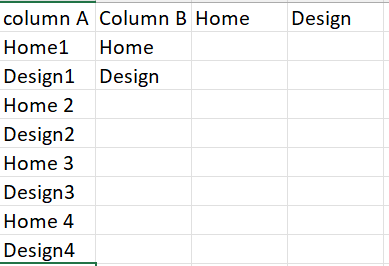
Need you expert advice i want to create 2 columns within table using filter function. Below is how my data look.
Column A include both home & design types & column B can be used for filter. Now i want that based on column B i can put all home types under home & Design types under design column.
Regards
@Gaurav_84 , new columns
Column B = Switch( True() ,
search("Home",[ColumnA],,0) > 0 , "Home ",
search("Design",[ColumnA],,0) > 0 , "Design", Blank() )
Home = if([Column b] ="Home", "Home", blank())
Design= if([Column b] ="Design", "Home", blank())
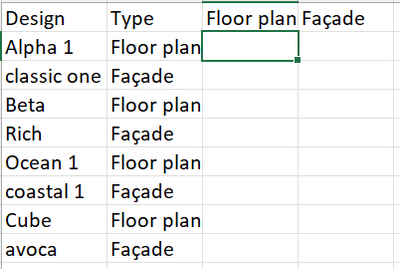
Hi Amit, Thanks for your response, i believe i have given the incorrect example. Right example should be like below one.
@Gaurav_84 , I think First switch has to change
example
Column B = Switch( True() ,
[Column A] in {"Value1", "Value2", "ABC",
//add others
search("Design",[ColumnA],,0) > 0 , "Design", Blank() )
If this does not help
Can you share sample data and sample output in table format? Or a sample pbix after removing sensitive data.
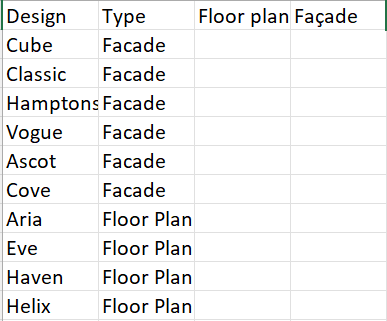
Thanks Amit, I got bit confused can you please explain the query you have written with below data example.
Vote for your favorite vizzies from the Power BI World Championship submissions!
If you love stickers, then you will definitely want to check out our Community Sticker Challenge!
Check out the January 2026 Power BI update to learn about new features.
| User | Count |
|---|---|
| 58 | |
| 53 | |
| 43 | |
| 17 | |
| 16 |
| User | Count |
|---|---|
| 123 | |
| 108 | |
| 44 | |
| 32 | |
| 24 |