cancel
Showing results for 
Search instead for 
Did you mean: 

The Power BI Data Visualization World Championships is back! It's time to submit your entry. Live now!

Reply
Gaurav_84
Helper I
Helper I

Filter column

Hi All,


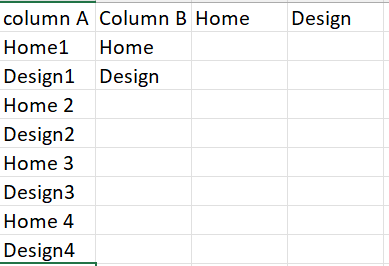
Need you expert advice i want to create 2 columns within table using filter function. Below is how my data look.

Column A include both home & design types & column B can be used for filter. Now i want that based on column B i can put all home types under home & Design types under design column.


Gaurav_84_1-1649131930206.png


Regards


4 REPLIES 4
amitchandak
Super User
Super User

@Gaurav_84 , new columns 

Column B  = Switch( True() ,

search("Home",[ColumnA],,0) > 0 , "Home ",

search("Design",[ColumnA],,0) > 0 , "Design", Blank() )


Home = if([Column b] ="Home", "Home", blank())


Design= if([Column b] ="Design", "Home", blank())

Share with Power BI Enthusiasts: Full Power BI Video (20 Hours) YouTube
Microsoft Fabric Series 60+ Videos YouTube
Microsoft Fabric Hindi End to End YouTube

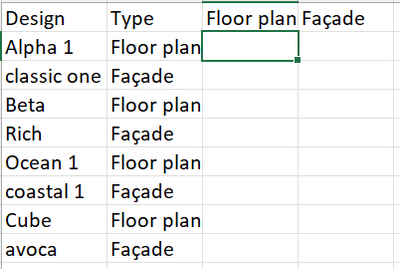
Hi Amit, Thanks for your response, i believe i have given the incorrect example. Right example should be like below one.

Gaurav_84_0-1649134241855.png


@Gaurav_84 , I think First switch has to change

example

Column B = Switch( True() ,

[Column A] in {"Value1", "Value2", "ABC",

//add others

search("Design",[ColumnA],,0) > 0 , "Design", Blank() )


If this does not help
Can you share sample data and sample output in table format? Or a sample pbix after removing sensitive data.

Share with Power BI Enthusiasts: Full Power BI Video (20 Hours) YouTube
Microsoft Fabric Series 60+ Videos YouTube
Microsoft Fabric Hindi End to End YouTube

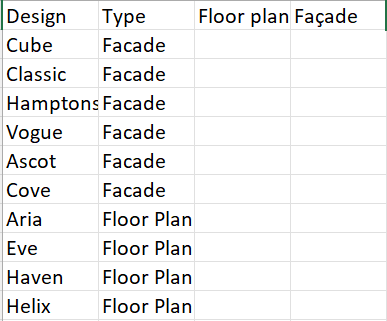
Thanks Amit, I got bit confused can you please explain the query you have written with below data example. 

Gaurav_84_0-1649135563939.png


Helpful resources

Announcements
FabCon Atlanta 2026 carousel

FabCon Atlanta 2026

Join us at FabCon Atlanta, March 16-20, for the ultimate Fabric, Power BI, AI and SQL community-led event. Save $200 with code FABCOMM.