Don't miss your chance to take exam DP-600 or DP-700 on us!
Request nowLearn from the best! Meet the four finalists headed to the FINALS of the Power BI Dataviz World Championships! Register now
Hi PBI Buddies,
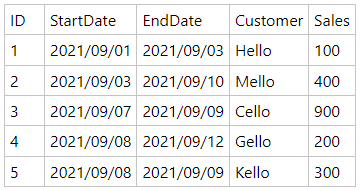
I have a sales table simplifed as follow:
There is a date table as a slicer, so that when I select date 2021/09/01, record ID 1 will be displayed in a table visual
select 2021/09/02, display ID 1,
2021/09/03, display ID 1, 2
2021/09/04, display ID 2
2021/09/05, display ID 2
2021/09/06, display ID 2
2021/09/07, display ID 2, 3
2021/09/08, display ID 2, 3, 4, 5
2021/09/09, display ID 2, 3, 4, 5
2021/09/10, display ID 2, 4
so on...
I'm wondering is it possible to do? thank you very much
Solved! Go to Solution.
Oke if I understand correctly you always select one date in the slicer, and then want to see all records in the table where that selected date is between the start and end date of that record?
In that case perhaps this will work for you:
1. create a measure which return 1 if the selected date (SELECTEDVALUE()) is between the start and end date of the row
2. place that measure in the filter pane and set it to "value is 1"
3. now, when you select a date in your date slicer, the table will only return the rows where the measure calculation results in a 1.
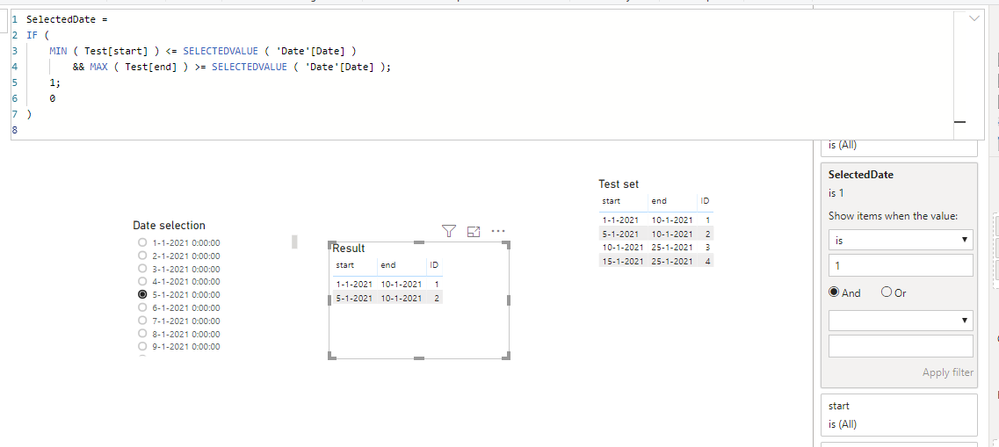
here is an example of the measure:
SelectedDate =
IF (
MIN ( Test[start] ) <= SELECTEDVALUE ( 'Date'[Date] )
&& MAX ( Test[end] ) >= SELECTEDVALUE ( 'Date'[Date] );
1;
0
)and a test where this method seems to work:
Hope that solves it for you,
Tim
Proud to be a Super User!
Hi Simon,
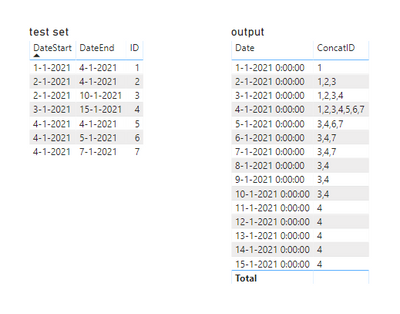
This should do the trick. Below you will find an example of the end result.
The CONCATENATEX ( VALUES ( TestTable[ID] ); TestTable[ID]; "," ); concats all your column values
The FILTER(.... filters the concatenated values to only include the id's that appear between the start and end date.
ConcatID =
CALCULATE (
CONCATENATEX ( VALUES ( TestTable[ID] ); TestTable[ID]; "," );
FILTER (
'TestTable';
TestTable[DateStart] < SELECTEDVALUE ( 'Calendar'[Date] )
&& TestTable[DateEnd] > SELECTEDVALUE ( 'Calendar'[Date] )
)
)
Hope that helps!
Regards,
Tim
Proud to be a Super User!
Thanks so much, really appreciate your help, it's closer.
However it is not my expected result.
In my case, there are 2 visuals, 1 is a slicer and 1 is a table
The Date table is used as a Slicer, when I select "2021/09/07", the Table would show the details of ID 2 & 3 (Mello/400, Cello/900 etc...)
When I select "2021/09/08" or "2021/09/09", the Table would show the details of ID 2 to 5 (Mello..Cello.. Gello.. Kello...)
So on...
Oke if I understand correctly you always select one date in the slicer, and then want to see all records in the table where that selected date is between the start and end date of that record?
In that case perhaps this will work for you:
1. create a measure which return 1 if the selected date (SELECTEDVALUE()) is between the start and end date of the row
2. place that measure in the filter pane and set it to "value is 1"
3. now, when you select a date in your date slicer, the table will only return the rows where the measure calculation results in a 1.
here is an example of the measure:
SelectedDate =
IF (
MIN ( Test[start] ) <= SELECTEDVALUE ( 'Date'[Date] )
&& MAX ( Test[end] ) >= SELECTEDVALUE ( 'Date'[Date] );
1;
0
)and a test where this method seems to work:
Hope that solves it for you,
Tim
Proud to be a Super User!
😍😍😍It works perfectly, thank you so much!
As I will receive files daily and accumulate them, but most of the data are repeated
This action can help saving many file sizes.
Share feedback directly with Fabric product managers, participate in targeted research studies and influence the Fabric roadmap.
Check out the February 2026 Power BI update to learn about new features.
| User | Count |
|---|---|
| 55 | |
| 45 | |
| 38 | |
| 16 | |
| 14 |
| User | Count |
|---|---|
| 87 | |
| 68 | |
| 38 | |
| 29 | |
| 26 |