Don't miss your chance to take the Fabric Data Engineer (DP-600) exam for FREE! Find out how by attending the DP-600 session on April 23rd (pacific time), live or on-demand.
Learn moreJoin the FabCon + SQLCon recap series. Up next: Power BI, Real-Time Intelligence, IQ and AI, and Data Factory take center stage. All sessions are available on-demand after the live show. Register now
Hi everyone.
I'm working on a Sales Table like this one below:
DATE PRODUCT ID Revenue
1/1/2015 AA 100
2/2/2015 AB 200
3/3/2015 AA 300
4/4/2015 BA 400
5/5/2015 BB 500
It is easy to plot Revenue vs. Date, no problems so far.
But what I really want to do is the following:
I want to use a filter by date (available for user - through the Dashboard), i.e., I want to let the the user choose one of the dates (01/01, 02/02/ 03/03,... ) as a Reference for the Revenue Column.
In other words, if the user selects "02/02/2015" on a filter, the value "200" is the new reference and others values of this Column (Revenue) is now referenced as below:
obs: it doesn't need to change the values of the table. I just want to use these values to plot the graph descibed below.
DATE PRODUCT ID Revenue [NEW]
1/1/2015 AA 0.5 (i.e., 100/200)
2/2/2015 AB 1.0 (i.e., 200/200)
3/3/2015 AA 1.5 (i.e., 300/200)
4/4/2015 BA 2.0 (i.e., 400/200)
5/5/2015 BB 2.5 (i.e., 500/200)
And then, finnaly, I want a Graph Date vs. Revenue [New], using these new values (0.5, 1.0, 1.5 ...).
Does anyone know how to solve it?
It seems do be quite easy, but I don't get the answer.
Regards,
Matheus.
Solved! Go to Solution.
Hi @Matheus_bnm,
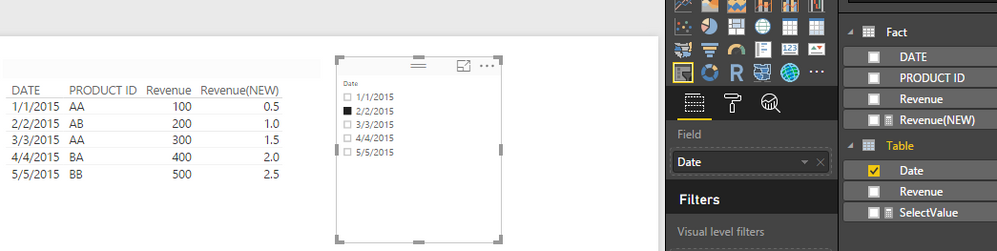
In your scenario, you can create another table which has the DATE and Revenue columns. Make sure there is no relationship between this new table and the original one.
Table = SELECTCOLUMNS('Fact',"Date",'Fact'[Date],"Revenue",'Fact'[Revenue])
Then create a measure in this new table:
SelectValue = IF(HASONEVALUE('Table'[Date]),VALUES('Table'[Revenue]),BLANK())
Create a measure in original table:
Revenue(NEW) = DIVIDE(SUM(Fact[Revenue]),'Table'[SelectValue],0)
Then drag the Date column from the new table into a slicer visual,
Best Regards,
Qiuyun Yu
Hi @Matheus_bnm,
In your scenario, you can create another table which has the DATE and Revenue columns. Make sure there is no relationship between this new table and the original one.
Table = SELECTCOLUMNS('Fact',"Date",'Fact'[Date],"Revenue",'Fact'[Revenue])
Then create a measure in this new table:
SelectValue = IF(HASONEVALUE('Table'[Date]),VALUES('Table'[Revenue]),BLANK())
Create a measure in original table:
Revenue(NEW) = DIVIDE(SUM(Fact[Revenue]),'Table'[SelectValue],0)
Then drag the Date column from the new table into a slicer visual,
Best Regards,
Qiuyun Yu
Check out the April 2026 Power BI update to learn about new features.
If you have recently started exploring Fabric, we'd love to hear how it's going. Your feedback can help with product improvements.
A new Power BI DataViz World Championship is coming this June! Don't miss out on submitting your entry.
| User | Count |
|---|---|
| 48 | |
| 40 | |
| 37 | |
| 20 | |
| 16 |
| User | Count |
|---|---|
| 68 | |
| 67 | |
| 30 | |
| 26 | |
| 26 |