Join us at FabCon Atlanta from March 16 - 20, 2026, for the ultimate Fabric, Power BI, AI and SQL community-led event. Save $200 with code FABCOMM.
Register now!Get Fabric Certified for FREE during Fabric Data Days. Don't miss your chance! Request now
The goal is to concatinate Group 300 and 400 in the Pie chart to the left so it becomes one "999" group.
The data is simple in my example:
| Group | Value | Year |
| 100 | 100000 | 2018 |
| 100 | 600000 | 2019 |
| 200 | 250000 | 2018 |
| 200 | 300000 | 2018 |
| 300 | 100000 | 2019 |
| 400 | 50000 | 2018 |
| 500 | 200000 | 2019 |
| 500 | 100000 | 2018 |
I added a column that rewrites the Group codes (This works):
New Group =
IF(
CALCULATE(
SUM(Table1[Value]),
FILTER(Table1, Table1[Group] = EARLIER(Table1[Group] )
)
) > 200000 ,Table1[Group] , 999 )But the problem comes when I also need a slicer on the page. When using a column, it doesn't care about the Slicer values since it is in the report view. But I cannot use a measure since it cannot be the legend in a Pie chart.
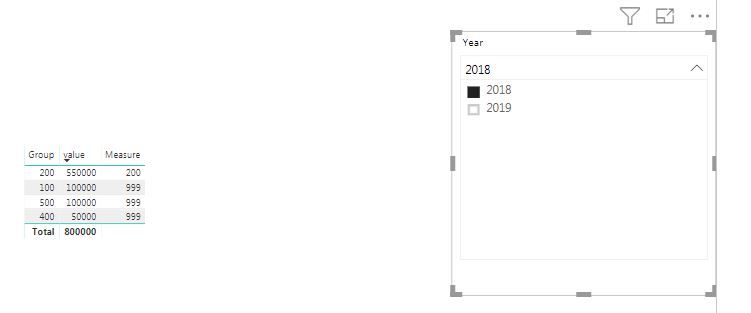
Prof of problem: When excluding 2019 in the slicer, the Group code 100 isn't grouped although it's below value 200000.
Any idéas?
You find the sample on Onedrive
I created a measure for this. Please try this to see if this works. Thanks
Measure = if(SUM(Sheet16[value])>200000,SELECTEDVALUE(Sheet16[Group]),999)
Proud to be a Super User!
Thx for reply @ryan_may!
The problem is that I cannot use the the measure as a Legend in the Pie chart.
I see. Let's see if anyone else has the solution for this. Sorry I didn't resolve this.
Proud to be a Super User!
Check out the November 2025 Power BI update to learn about new features.
Advance your Data & AI career with 50 days of live learning, contests, hands-on challenges, study groups & certifications and more!