cancel
Showing results for 
Search instead for 
Did you mean: 

The Power BI Data Visualization World Championships is back! Get ahead of the game and start preparing now! Learn more

Reply
MrMarshall
Helper II
Helper II

Filter and grouping problems on Pie chart

The goal is to concatinate Group 300 and 400 in the Pie chart to the left so it becomes one "999" group.


Screenshot_283.png

The data is simple in my example: 

GroupValueYear
1001000002018
1006000002019
2002500002018
2003000002018
3001000002019
400500002018
5002000002019
5001000002018

I added a column that rewrites the Group codes (This works):

 
New Group = 
IF(
    CALCULATE(
        SUM(Table1[Value]),
        FILTER(Table1, Table1[Group] = EARLIER(Table1[Group] )
    )
) > 200000 ,Table1[Group] , 999 )

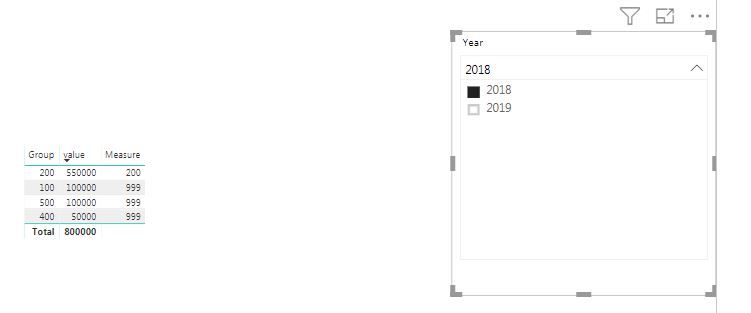
But the problem comes when I also need a slicer on the page. When using a column, it doesn't care about the Slicer values since it is in the report view. But I cannot use a measure since it cannot be the legend in a Pie chart. 


Prof of problem: When excluding 2019 in the slicer, the Group code 100 isn't grouped although it's below value 200000. 


Any idéas?
You find the sample on Onedrive

 
3 REPLIES 3
ryan_mayu
Super User
Super User

@MrMarshall


I created a measure for this. Please try this to see if this works. Thanks


Measure = if(SUM(Sheet16[value])>200000,SELECTEDVALUE(Sheet16[Group]),999)

c1.JPGc2.JPG


Did I answer your question? Mark my post as a solution!

Proud to be a Super User!


Thx for reply @ryan_may!


The problem is that I cannot use the the measure as a Legend in the Pie chart. 

@MrMarshall


I see. Let's see if anyone else has the solution for this. Sorry I didn't resolve this.


Did I answer your question? Mark my post as a solution!

Proud to be a Super User!


Helpful resources

Announcements
Power BI DataViz World Championships

Power BI Dataviz World Championships

The Power BI Data Visualization World Championships is back! Get ahead of the game and start preparing now!

December 2025 Power BI Update Carousel

Power BI Monthly Update - December 2025

Check out the December 2025 Power BI Holiday Recap!

FabCon Atlanta 2026 carousel

FabCon Atlanta 2026

Join us at FabCon Atlanta, March 16-20, for the ultimate Fabric, Power BI, AI and SQL community-led event. Save $200 with code FABCOMM.