This time we’re going bigger than ever. Fabric, Power BI, SQL, AI and more. We're covering it all. You won't want to miss it.
Learn moreDid you hear? There's a new SQL AI Developer certification (DP-800). Start preparing now and be one of the first to get certified. Register now
Hey guys,
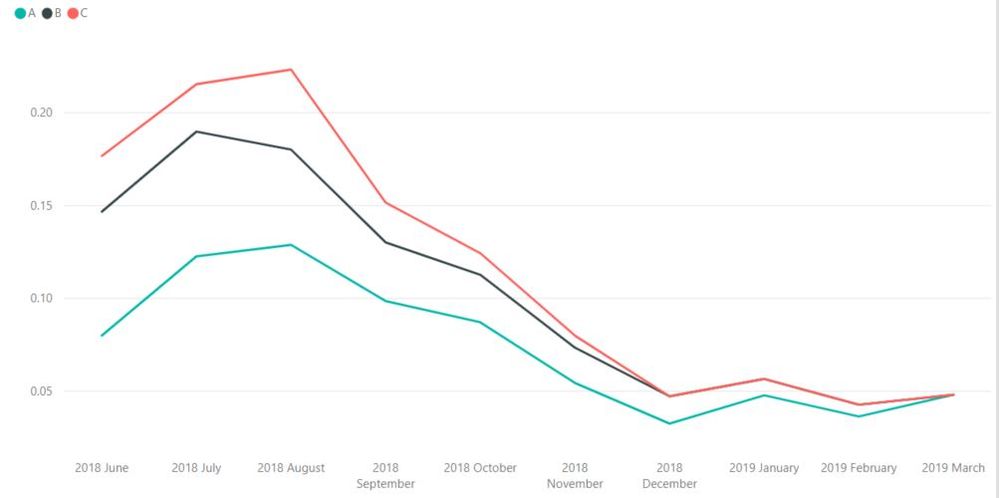
Is is possible to filter out the X axis by values in a Line Graph? I have 3 values, but I want to be able to filter out the values by their own Date, currently they all end at March 2019. I would something like: (Values A ends at Jan 2019, Values B ends at November 2018 and Values C ends at August 2018). Is this only possible through the equation of the values itself?
Thanks!
Solved! Go to Solution.
You would need to write a DAX measure that senses the date and returns a value (or not) based on that date. I recommend setting up a matrix while you write the measure. It helps you “see” the problem like and Excel problem.
Hi @Anonymous ,
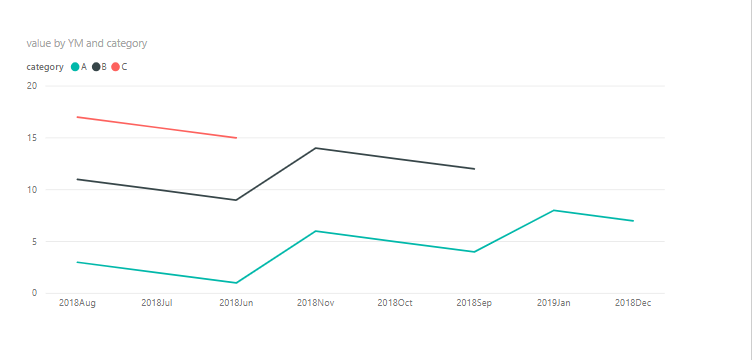
1 To create a date table as below and insert a calculated column in it. After that , we can create relationship between it and the fact table.
date = CALENDARAUTO()
YM = FORMAT('date'[Date],"yyyymmm")
2. Then we can creater a line visual as below.
Check out the April 2026 Power BI update to learn about new features.
Sign up to receive a private message when registration opens and key events begin.
If you have recently started exploring Fabric, we'd love to hear how it's going. Your feedback can help with product improvements.
| User | Count |
|---|---|
| 34 | |
| 31 | |
| 25 | |
| 20 | |
| 16 |
| User | Count |
|---|---|
| 61 | |
| 49 | |
| 28 | |
| 23 | |
| 23 |