This time we’re going bigger than ever. Fabric, Power BI, SQL, AI and more. We're covering it all. You won't want to miss it.
Learn moreLevel up your Power BI skills this month - build one visual each week and tell better stories with data! Get started
Hey guys,
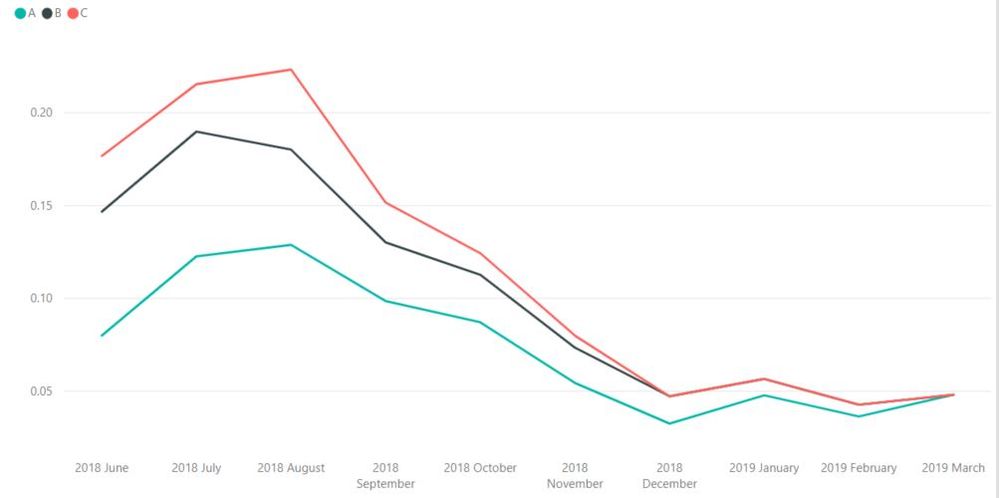
Is is possible to filter out the X axis by values in a Line Graph? I have 3 values, but I want to be able to filter out the values by their own Date, currently they all end at March 2019. I would something like: (Values A ends at Jan 2019, Values B ends at November 2018 and Values C ends at August 2018). Is this only possible through the equation of the values itself?
Thanks!
Solved! Go to Solution.
You would need to write a DAX measure that senses the date and returns a value (or not) based on that date. I recommend setting up a matrix while you write the measure. It helps you “see” the problem like and Excel problem.
Hi @Anonymous ,
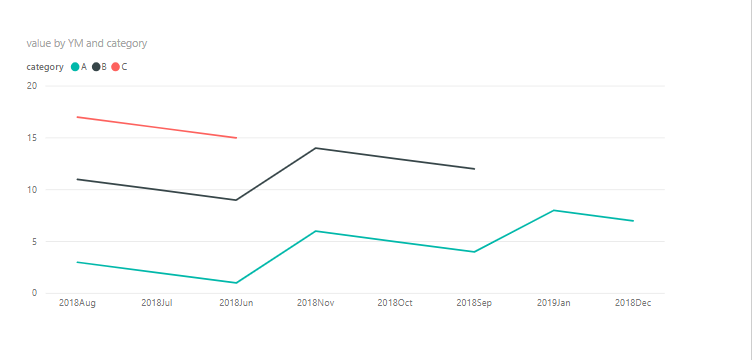
1 To create a date table as below and insert a calculated column in it. After that , we can create relationship between it and the fact table.
date = CALENDARAUTO()
YM = FORMAT('date'[Date],"yyyymmm")
2. Then we can creater a line visual as below.
Check out the April 2026 Power BI update to learn about new features.
Sign up to receive a private message when registration opens and key events begin.
If you have recently started exploring Fabric, we'd love to hear how it's going. Your feedback can help with product improvements.
| User | Count |
|---|---|
| 31 | |
| 25 | |
| 21 | |
| 18 | |
| 17 |
| User | Count |
|---|---|
| 61 | |
| 35 | |
| 33 | |
| 23 | |
| 23 |