cancel
Showing results for 
Search instead for 
Did you mean: 

The Power BI Data Visualization World Championships is back! Get ahead of the game and start preparing now! Learn more

Reply
brunoemr
Frequent Visitor

Filter Table Dynamically

Hi,


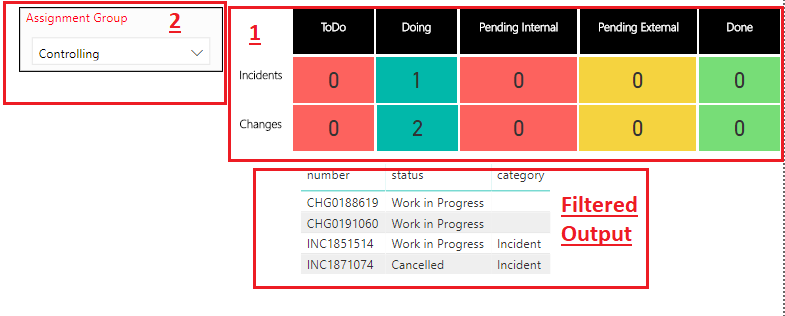
I need to filter a table "Filtered Output" when i click on one of blocks(it's card).

If i click on Block( "Doing/ Incidents") the filtered output must have only one record. The area "1" and "Filtered Output" needs to be filtered by value selected on slicer "Assignment Group".

How can i accomplished this?


sample.png

Best Regards,

Bruno Roque


1 ACCEPTED SOLUTION
MFelix
Super User
Super User

Hi @brunoemr,


To what I can understand your section 1 is composed by Cards visual correct?


Using Card visuals you can't filter out other visuals since Cards only have one value, Why don't you replace your visual from cards to a Table, and then you can filter the final table.


Using the conditional formatting on table you can make the colours on the columns, for this you need to have an additional table with colours for each of your status (Todo, Doing,..)


Check PBIX file, this setup is not as yours for sure, but if you give some sample data I can make a example with your data.


Regards,

MFelix


Regards

Miguel Félix


Did I answer your question? Mark my post as a solution!

Proud to be a Super User!

Check out my blog: Power BI em Português


View solution in original post

4 REPLIES 4
MFelix
Super User
Super User

Hi @brunoemr,


To what I can understand your section 1 is composed by Cards visual correct?


Using Card visuals you can't filter out other visuals since Cards only have one value, Why don't you replace your visual from cards to a Table, and then you can filter the final table.


Using the conditional formatting on table you can make the colours on the columns, for this you need to have an additional table with colours for each of your status (Todo, Doing,..)


Check PBIX file, this setup is not as yours for sure, but if you give some sample data I can make a example with your data.


Regards,

MFelix


Regards

Miguel Félix


Did I answer your question? Mark my post as a solution!

Proud to be a Super User!

Check out my blog: Power BI em Português


Hi,


Thanks, I will try to do using your example @MFelix 🙂 


Thanks in advance,

Bruno R.

Hi @brunoemr

Could you kindly accept MFelix's reply as a solution if it really helps you?

If not, don't hesiate to ask here.


Best Regards

Maggie

vinaypugalia
Resolver I
Resolver I

You can easily achieve this out-of-box by setting up the right table relationships. Hence, if you can share your data model, that will really help us to assist you further.

Helpful resources

Announcements
Power BI DataViz World Championships

Power BI Dataviz World Championships

The Power BI Data Visualization World Championships is back! Get ahead of the game and start preparing now!

December 2025 Power BI Update Carousel

Power BI Monthly Update - December 2025

Check out the December 2025 Power BI Holiday Recap!

FabCon Atlanta 2026 carousel

FabCon Atlanta 2026

Join us at FabCon Atlanta, March 16-20, for the ultimate Fabric, Power BI, AI and SQL community-led event. Save $200 with code FABCOMM.

Top Solution Authors