
This is best Fabric, Power BI, SQL and AI community event. How do we know? The last event sold out! Save €200 with code FABCMTY200.
Register nowThe Fabric community is now in read-only for platform upgrade. Learn more
I am trying to filter rows of data based on 2 conditions, if store = X and date is X. Then if the 2 conditions are met, I need the row removed. How should this be coded in query editor? I'm struggling! Thanks.
Solved! Go to Solution.
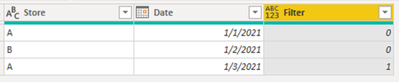
In Power Query, create a custom column:
if [Store] = "A" and [Date] = #date(2021, 1, 3) then 1 else 0
Then filter the custom column to exclude 1:
Proud to be a Super User!
In Power Query, create a custom column:
if [Store] = "A" and [Date] = #date(2021, 1, 3) then 1 else 0
Then filter the custom column to exclude 1:
Proud to be a Super User!
Join us in Barcelona for FabCon and SQLCon, the Fabric, Power BI, SQL, and AI community event. Save €200 with code FABCMTY200.
| User | Count |
|---|---|
| 21 | |
| 21 | |
| 14 | |
| 14 | |
| 13 |
| User | Count |
|---|---|
| 47 | |
| 36 | |
| 24 | |
| 20 | |
| 20 |