Get Fabric certified for FREE!
Don't miss your chance to take the Fabric Data Engineer (DP-700) exam on us!
Learn more- Power BI forums
- Get Help with Power BI
- Desktop
- Service
- Report Server
- Power Query
- Mobile Apps
- Developer
- DAX Commands and Tips
- Custom Visuals Development Discussion
- Health and Life Sciences
- Power BI Spanish forums
- Translated Spanish Desktop
- Training and Consulting
- Instructor Led Training
- Dashboard in a Day for Women, by Women
- Galleries
- Data Stories Gallery
- Themes Gallery
- Contests Gallery
- QuickViz Gallery
- Quick Measures Gallery
- Visual Calculations Gallery
- Notebook Gallery
- Translytical Task Flow Gallery
- TMDL Gallery
- R Script Showcase
- Webinars and Video Gallery
- Ideas
- Custom Visuals Ideas (read-only)
- Issues
- Issues
- Events
- Upcoming Events
Next up in the FabCon + SQLCon recap series: The roadmap for Microsoft SQL and Maximizing Developer experiences in Fabric. All sessions are available on-demand after the live show. Register now
- Power BI forums
- Forums
- Get Help with Power BI
- Desktop
- Re: Filter Pane Dropdown Text
- Subscribe to RSS Feed
- Mark Topic as New
- Mark Topic as Read
- Float this Topic for Current User
- Bookmark
- Subscribe
- Printer Friendly Page

- Mark as New
- Bookmark
- Subscribe
- Mute
- Subscribe to RSS Feed
- Permalink
- Report Inappropriate Content
Filter Pane Dropdown Text
I have updated the theme for my filter pane to have a font color of white. It looks great until you try to select something within the filter, such as Name contains, then the text is black.
Filter pane:
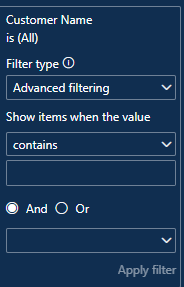
Dropdown:

As you can see, the text is barely visible. Below is the JSON for the filter theme:
"outspacePane": [{
		"backgroundColor": {
			"solid": {
				"color": "#102E50"
			}
		},
		"foregroundColor": {
			"solid": {
				"color": "#FFFFFF"
			}
		},
		"transparency": 0,
		"border": true,
		"borderColor": {
			"solid": {
				"color": "#6f8196"
			}
		},
		"checkboxAndApplyColor": {
			"solid": {
				"color": "#EC7014"
			}
		}
	}
],
"filterCard": [{
		"$id": "Applied",
		"transparency": 0,
		"foregroundColor": {
			"solid": {
				"color": "#FFFFFF"
			}
		},
		"backgroundColor": {
			"solid": {
				"color": "#3f5772"
			}
		},
		"inputBoxColor": {
			"solid": {
				"color": "#3f5772"
			}
		},
		"borderColor": {
			"solid": {
				"color": "#6f8196"
			}
		},
		"border": true
	}, {
		"$id": "Available",
		"transparency": 0,
		"foregroundColor": {
			"solid": {
				"color": "#FFFFFF"
			}
		},
		"backgroundColor": {
			"solid": {
				"color": "#102E50"
			}
		},
		"inputBoxColor": {
			"solid": {
				"color": "#102E50"
			}
		},
		"borderColor": {
			"solid": {
				"color": "#6f8196"
			}
		},
		"border": true
	}
]
Is this a known issue for the newest version? I am using Version: 2.116.843.0 64-bit (April 2023).
Thank you,
Sara
Solved! Go to Solution.
- Mark as New
- Bookmark
- Subscribe
- Mute
- Subscribe to RSS Feed
- Permalink
- Report Inappropriate Content
I ended up using a different color scheme. Thank you!


- Mark as New
- Bookmark
- Subscribe
- Mute
- Subscribe to RSS Feed
- Permalink
- Report Inappropriate Content
@swjagodzinski Hello Sara,
Kindly change your background color from #102E50 to #E6E6E6.
Where ever you have used this #102E50 over there you have to use #E6E6E6.
Thanks
Harish M

- Mark as New
- Bookmark
- Subscribe
- Mute
- Subscribe to RSS Feed
- Permalink
- Report Inappropriate Content
Did you figure this out?
- Mark as New
- Bookmark
- Subscribe
- Mute
- Subscribe to RSS Feed
- Permalink
- Report Inappropriate Content
I ended up using a different color scheme. Thank you!
- Mark as New
- Bookmark
- Subscribe
- Mute
- Subscribe to RSS Feed
- Permalink
- Report Inappropriate Content
Unfortunately, this did not help me. I'm not exactly sure what to do with the levels. I have added my entire JSON.
{
    "name": "Name",
    "dataColors": ["#1D84B5", "#9ED9EF", "#D2F2FC", "#EC7014", "#F9B180", "#F9D9AF",  "#449773", "#69BB97", "#9BD2BA", "#505151", "#C7CCCD", "#DEE7E7"],
    "foreground": "#FFFFFF",
    "foregroundNeutralSecondary": "#D2D0CE",
    "foregroundNeutralTertiary": "#6f8196",
    "background": "#102E50",
    "backgroundLight": "#274261",
    "backgroundNeutral": "#3f5772",
    "tableAccent": "#2878BD",
    "maximum": "#2878BD",
    "center": "#FCB714",
    "minimum": "#D0E4F5",
    "hyperlink": "#FFFFFF",
    "visitedHyperlink": "#D0E4F5",
    "visualStyles": {
        "*": {
            "*": {
                "background": [{
                        "color": {
                            "solid": {
                                "color": "#102E50"
                            }
                        }
                    }
                ],
                "visualHeader": [{
                        "foreground": {
                            "solid": {
                                "color": "#FFFFFF"
                            }
                        },
                        "border": {
                            "solid": {
                                "color": "#102E50"
                            }
                        },
                        "background": {
                            "solid": {
                                "color": "#102E50"
                            }
                        }
                    }
                ],
                "visualTooltip": [{
                        "titleFontColor": {
                            "solid": {
                                "color": "#FFFFFF"
                            }
                        },
                        "valueFontColor": {
                            "solid": {
                                "color": "#FFFFFF"
                            }
                        },
                        "background": {
                            "solid": {
                                "color": "#102E50"
                            }
                        }
                    }
                ],
		"outspacePane": [{
				"backgroundColor": {
					"solid": {
						"color": "#102E50"
					}
				},
				"foregroundColor": {
					"solid": {
						"color": "#FFFFFF"
					}
				},
				"transparency": 0,
				"border": true,
				"borderColor": {
					"solid": {
						"color": "#6f8196"
					}
				},
				"checkboxAndApplyColor": {
					"solid": {
						"color": "#EC7014"
					}
				}
			}
		],
		"filterCard": [{
				"$id": "Applied",
				"transparency": 0,
				"foregroundColor": {
					"solid": {
						"color": "#FFFFFF"
					}
				},
				"backgroundColor": {
					"solid": {
						"color": "#3f5772"
					}
				},
				"inputBoxColor": {
					"solid": {
						"color": "#3f5772"
					}
				},
				"borderColor": {
					"solid": {
						"color": "#6f8196"
					}
				},
				"border": true
			}, {
				"$id": "Available",
				"transparency": 0,
				"foregroundColor": {
					"solid": {
						"color": "#FFFFFF"
					}
				},
				"backgroundColor": {
					"solid": {
						"color": "#102E50"
					}
				},
				"inputBoxColor": {
					"solid": {
						"color": "#102E50"
					}
				},
				"borderColor": {
					"solid": {
						"color": "#6f8196"
					}
				},
				"border": true
			}
		]
            }
        },
        "slicer": {
            "*": {
                "items": [{
                        "background": {
                            "solid": {
                                "color": "#274261"
                            }
                        },
						"backgroundColor": {
							"solid": {
								"color": "#274261"
							}
							}
                    }
                ],
                "numericInputStyle": [{
                        "background": {
                            "solid": {
                                "color": "#274261"
                            }
                        }
                    }
                ],
				"date": [
					{
					  "background": {
						"solid": {
						  "color": "#274261"
						}
					  }
					}
				],
                "selected": [{
                        "checkbox": {
                            "color": "#EC7014"
                        }
                    }
                ],
				"header": [{
						"background": {
							"solid": {
								"color": "#274261"
							}
						}
					}
				],
				"background": [{
						"color": {
							"solid": {
								"color": "#274261"
							}
						}
					}
				]
            }
        },
        "keyDriversVisual": {
            "*": {
                "keyInfluencersVisual": [{
                        "canvasColor": {
                            "solid": {
                                "color": "#274261"
                            }
                        }
                    }
                ]
            }
        },
        "card": {
            "*": {
                "background": [{
                        "color": {
                            "solid": {
                                "color": "#274261"
                            }
                        }
                    }
                ]
            }
        },
        "multiRowCard": {
            "*": {
                "background": [{
                        "color": {
                            "solid": {
                                "color": "#274261"
                            }
                        }
                    }
                ]
            }
        },
        "page": {
            "*": {
                "outspace": [{
                        "color": {
                            "solid": {
                                "color": "#102E50"
                            }
                        }
                    }
                ],
                "background": [{
                        "transparency": 0
                    }
                ]
            }
        }
    },
    "textClasses": {
        "callout": {
            "fontFace": "Object Sans",
            "color": "#FFFFFF"
        },
        "title": {
            "fontFace": "Object Sans",
            "color": "#FFFFFF"
        },
        "header": {
            "fontFace": "Object Sans",
            "color": "#FFFFFF"
        },
        "label": {
            "fontFace": "Object Sans",
            "color": "#FFFFFF"
        },
        "smallLightLabel": {
            "fontFace": "Object Sans",
            "color": "#FFFFFF"
        },
        "lightLabel": {
            "fontFace": "Object Sans",
            "color": "#FFFFFF"
        },
        "largeLightLabel": {
            "fontFace": "Object Sans",
            "color": "#FFFFFF"
        },
        "boldLabel": {
            "fontFace": "Object Sans",
            "color": "#FFFFFF"
        },
        "smallLabel": {
            "fontFace": "Object Sans",
            "color": "#FFFFFF"
        },
        "largeLabel": {
            "fontFace": "Object Sans",
            "color": "#FFFFFF"
        },
        "semiboldLabel": {
            "fontFace": "Object Sans",
            "color": "#FFFFFF"
        },
        "largeTitle": {
            "fontFace": "Object Sans",
            "color": "#FFFFFF"
        }
    }
}
Is it possible to change the black font color in this dropdown to white?


- Mark as New
- Bookmark
- Subscribe
- Mute
- Subscribe to RSS Feed
- Permalink
- Report Inappropriate Content
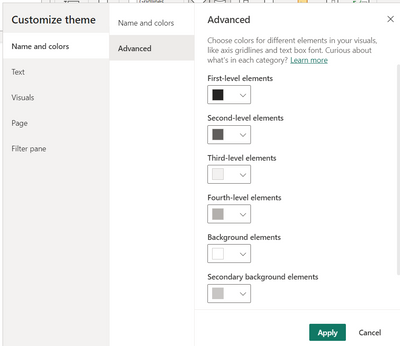
@swjagodzinski , Please check the meaning of level here, if that can help in setup
Use report themes in Power BI Desktop - Power BI | Microsoft Learn

Helpful resources

New to Fabric Survey
If you have recently started exploring Fabric, we'd love to hear how it's going. Your feedback can help with product improvements.

Power BI DataViz World Championships - June 2026
A new Power BI DataViz World Championship is coming this June! Don't miss out on submitting your entry.

Join our Fabric User Panel
Share feedback directly with Fabric product managers, participate in targeted research studies and influence the Fabric roadmap.

Power BI Community Update - March 2026
Check out the March 2026 Power BI update to learn about new features.

| User | Count |
|---|---|
| 50 | |
| 44 | |
| 41 | |
| 18 | |
| 18 |


| User | Count |
|---|---|
| 69 | |
| 68 | |
| 32 | |
| 32 | |
| 32 |


