We've captured the moments from FabCon & SQLCon that everyone is talking about, and we are bringing them to the community, live and on-demand. Starts on April 14th. Register now
Hello, I am a beginner in Power BI and I couldn't solve this problem on my own.
I have a table with the following columns:
| Task Name | Status | Priority | Task Completion Date | Priority Interval(Custom Column) |
| Task Name 1 | Completed | 1.4 | 5.06.2023 | 0-1.5 Priority |
| Task Name 2 | Waiting | 2.3 | null | 1.5-3.5 Priority |
| Task Name 3 | Postponed | 3 | null | 1.5-3.5 Priority |
| Task Name 5 | null | 5 | null | 3.5-5 Priority |
| ............ | .............. | .......... | ................. | .......................... |
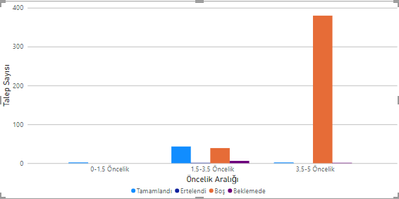
By using this data source, I have created a stacked bar chart. On the X-Axis, it shows priority intervals while on the Y-Axis it shows amount of tasks grouped according to their statuses. I created 4 measures for each of statuses in table by filtering status measure. So far chart looks like this:
The problem I encounter is when I apply a slicer which uses "Task Completion Date" as value, it only filters tasks with "Completed" status, because other statuses don't have completion date. To prevent that, only measure "Tasks with Completed status" must be affected from slicer. Other 3 measures remain same. That means only one bar in the picture above should change when user interact with slicer while other 3 bars still same.
Thank you for your help.
Solved! Go to Solution.
Hi
Okay, so your measure for Completed should remain the same, but for the other statuses you can use something like this:
Postponed =
CALCULATE(
COUNTA('TableName'[TaskName]),
'TableName'[Status] IN { "Postponed" },
REMOVEFILTERS( 'TableName'[Task Completion Date] )
)
Hello @Adescrit , you can see DAX I have used below:
Hi
Okay, so your measure for Completed should remain the same, but for the other statuses you can use something like this:
Postponed =
CALCULATE(
COUNTA('TableName'[TaskName]),
'TableName'[Status] IN { "Postponed" },
REMOVEFILTERS( 'TableName'[Task Completion Date] )
)
@Adescrit It worked ,thank you so much. I guess I need to work on how to write DAX and DAX commands more 😄
Have a good day sir.
100%. DAX is the key to Power BI.
Hi @yigitarican are you able to provide the DAX you have used in one of your existing measures? I have an idea how to solve this but it would help if I can see what calculation you're currently doing.
If you have recently started exploring Fabric, we'd love to hear how it's going. Your feedback can help with product improvements.
A new Power BI DataViz World Championship is coming this June! Don't miss out on submitting your entry.
Share feedback directly with Fabric product managers, participate in targeted research studies and influence the Fabric roadmap.
| User | Count |
|---|---|
| 53 | |
| 38 | |
| 33 | |
| 16 | |
| 16 |
| User | Count |
|---|---|
| 66 | |
| 63 | |
| 37 | |
| 34 | |
| 22 |