Get certified for free when you join Fabric Data Days 2026 and dive into Fabric, Power BI, SQL, AI, and other essential data skills.
Join nowJuly 7 - July 17 | Round 2 of the Power BI Dataviz World Championships. Don't miss your chance! Learn more
I am new and apologize if this has been discussed prior, but I need to find away to filter data using data from a prior filtered result.
My table looks like this:
Name Skill
User 1 A,B,C
User 2 B,C,D
User 3 C,D,E
User 4 A,B,E
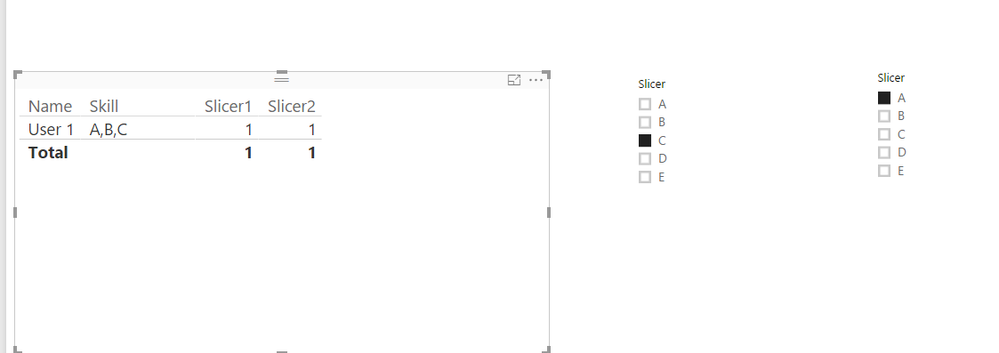
Using a filter or slicer, I would like to be able to find all of the users with Skill C then filter the result of that to find the Users with Skill A. Is this easy, difficult, possible?
Thank you in advance for your time and assisstance.
Solved! Go to Solution.
@Anonymous,
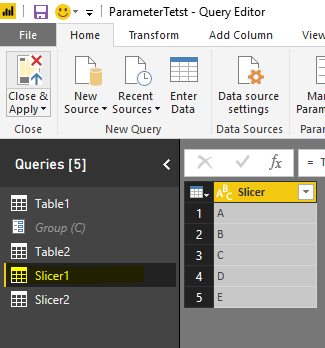
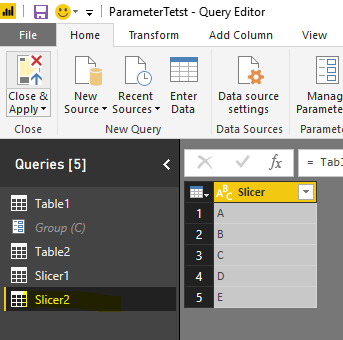
Create two tables(Slicer1 and Slicer2) which will be used in your slicer. Then create two measure in your original table.
Slicer1 =
var selecteditem = MAX(Slicer1[Slicer])
return IF(HASONEFILTER(Slicer1[Slicer]),IF(ISERROR(SEARCH(selecteditem,MAX(Table2[Skill]))),0,1),1)
Slicer2 =
var selecteditem = MAX(Slicer2[Slicer])
return IF(HASONEFILTER(Slicer2[Slicer]),IF(ISERROR(SEARCH(selecteditem,MAX(Table2[Skill]))),0,1),1)
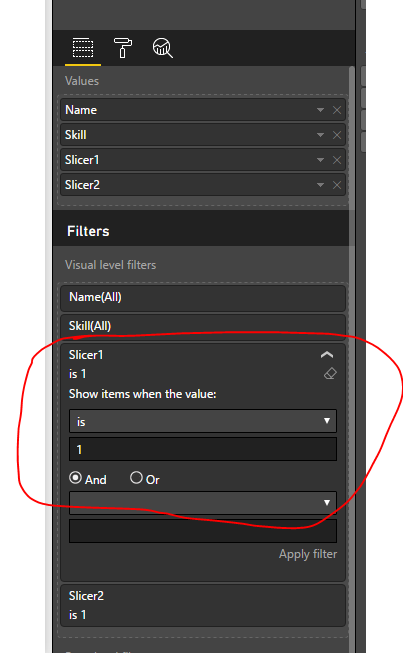
Then add those two measures into visual filter.
Regards,
Charlie Liao
@Anonymous,
Create two tables(Slicer1 and Slicer2) which will be used in your slicer. Then create two measure in your original table.
Slicer1 =
var selecteditem = MAX(Slicer1[Slicer])
return IF(HASONEFILTER(Slicer1[Slicer]),IF(ISERROR(SEARCH(selecteditem,MAX(Table2[Skill]))),0,1),1)
Slicer2 =
var selecteditem = MAX(Slicer2[Slicer])
return IF(HASONEFILTER(Slicer2[Slicer]),IF(ISERROR(SEARCH(selecteditem,MAX(Table2[Skill]))),0,1),1)
Then add those two measures into visual filter.
Regards,
Charlie Liao
This worked perfectly. Thank you for your time and assistance.
Join us in Barcelona for FabCon and SQLCon, the Fabric, Power BI, SQL, and AI community event. Save €200 with code FABCMTY200.
Join Data Days 2026: 60 days of free live/on-demand sessions, challenges, study groups, and certification opportunities.
| User | Count |
|---|---|
| 26 | |
| 23 | |
| 19 | |
| 18 | |
| 15 |
| User | Count |
|---|---|
| 47 | |
| 44 | |
| 43 | |
| 35 | |
| 30 |