This time we’re going bigger than ever. Fabric, Power BI, SQL, AI and more. We're covering it all. You won't want to miss it.
Learn moreJoin the FabCon + SQLCon recap series. Up next: Power BI, Real-Time Intelligence, IQ and AI, and Data Factory take center stage. All sessions are available on-demand after the live show. Register now
Hello All,
I have the following tables,
The requirement is,
I need to filter the Fact table based products which are available in Dim. For example, I filter 5 products in Dim. I would like to have only those 5 products in Fact.
Is there any option to do this without having a calculated table?
Thanks,
Siva
Solved! Go to Solution.
Thanks for the response.
It works if we have a relationship between the tables and firing a query to apply the filter explicitly by adding the filter in Report.
Hi @SivaMani,
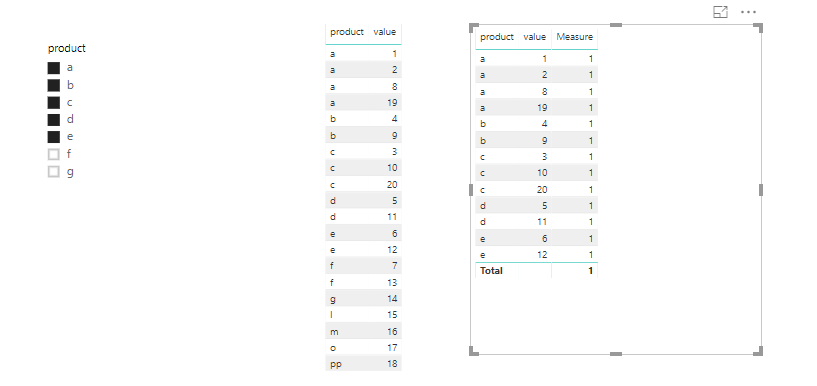
I made one sample for your reference.
1. Create a measure as below and filter the fact table by the measure. make the measure is 1.
Measure = IF(MAX('fact'[product]) in VALUES(Dim[product]),1,0)
For more details, please check the pbix as attaced.
Regards,
Frank
Thanks for the response.
It works if we have a relationship between the tables and firing a query to apply the filter explicitly by adding the filter in Report.
@SivaMani You mean, you want to filter the Fact table data when you use them in the visuals (as per the products available in Dim table). Could you please post a sample data before suggesting you something.
Proud to be a PBI Community Champion
Thanks for the reply @PattemManohar,
Yes. You're right. In my case, I'm not using any field in the visual.
I have a solution that merging to tables. It is costly in my case. So looking for a better way to do this.
I can't post any data here.
Check out the April 2026 Power BI update to learn about new features.
If you have recently started exploring Fabric, we'd love to hear how it's going. Your feedback can help with product improvements.
A new Power BI DataViz World Championship is coming this June! Don't miss out on submitting your entry.
| User | Count |
|---|---|
| 40 | |
| 37 | |
| 31 | |
| 23 | |
| 15 |
| User | Count |
|---|---|
| 76 | |
| 59 | |
| 31 | |
| 31 | |
| 25 |