This time we’re going bigger than ever. Fabric, Power BI, SQL, AI and more. We're covering it all. You won't want to miss it.
Learn moreDid you hear? There's a new SQL AI Developer certification (DP-800). Start preparing now and be one of the first to get certified. Register now
Hello All,
I have the following tables,
The requirement is,
I need to filter the Fact table based products which are available in Dim. For example, I filter 5 products in Dim. I would like to have only those 5 products in Fact.
Is there any option to do this without having a calculated table?
Thanks,
Siva
Solved! Go to Solution.
Thanks for the response.
It works if we have a relationship between the tables and firing a query to apply the filter explicitly by adding the filter in Report.
Hi @SivaMani,
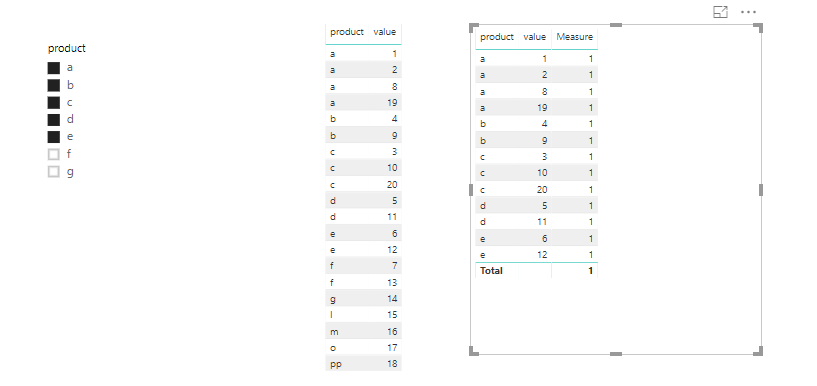
I made one sample for your reference.
1. Create a measure as below and filter the fact table by the measure. make the measure is 1.
Measure = IF(MAX('fact'[product]) in VALUES(Dim[product]),1,0)
For more details, please check the pbix as attaced.
Regards,
Frank
Thanks for the response.
It works if we have a relationship between the tables and firing a query to apply the filter explicitly by adding the filter in Report.
@SivaMani You mean, you want to filter the Fact table data when you use them in the visuals (as per the products available in Dim table). Could you please post a sample data before suggesting you something.
Proud to be a PBI Community Champion
Thanks for the reply @PattemManohar,
Yes. You're right. In my case, I'm not using any field in the visual.
I have a solution that merging to tables. It is costly in my case. So looking for a better way to do this.
I can't post any data here.
Check out the April 2026 Power BI update to learn about new features.
Sign up to receive a private message when registration opens and key events begin.
If you have recently started exploring Fabric, we'd love to hear how it's going. Your feedback can help with product improvements.
| User | Count |
|---|---|
| 36 | |
| 33 | |
| 31 | |
| 21 | |
| 16 |
| User | Count |
|---|---|
| 66 | |
| 55 | |
| 31 | |
| 24 | |
| 23 |