Share feedback directly with Fabric product managers, participate in targeted research studies and influence the Fabric roadmap.
Sign up nowGet Fabric certified for FREE! Don't miss your chance! Learn more
Hi!
I am new to power bi, I am laging with a problem i have 2 columns one contains Different Products like p1,q2,r1,s6,t4,a4,b5,c8,d9 etc... and in another other column i have cost of that Products now i need to create a new column that should contains only q,r,a,t,c COsts only remaining should display as 0
i am attaching sample data
| Products | cost | |
| p1 | 2 | |
| p2 | 6 | |
| q1 | 5 | |
| q1 | 7 | |
| p1 | 9 | |
| t1 | 3 | |
| r5 | 5 | |
| a4 | 4 | |
| a4 | 6 | |
| b6 | 4 | |
| b6 | 3 | |
| q2 | 0 | |
| s1 | 0 | |
| s1 | 6 | |
| c3 | 5 | |
| d3 | 89 | |
| d5 | 133 | |
| d5 | 45 | |
| c3 | 85 | |
| c3 | 25 |
Solved! Go to Solution.
Hi @JAVED,
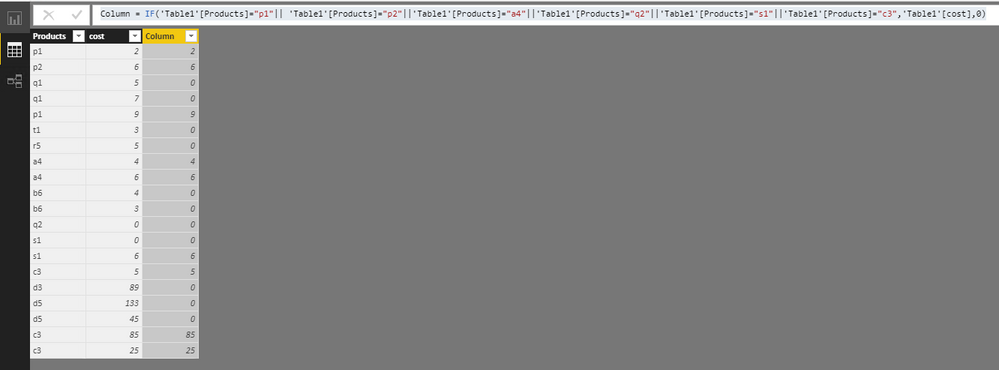
You can create a calculated column below:
Column = IF('Table1'[Products]="p1"|| 'Table1'[Products]="p2"||'Table1'[Products]="a4"||'Table1'[Products]="q2"||'Table1'[Products]="s1"||'Table1'[Products]="c3",'Table1'[cost],0)
Best Regards,
Qiuyun Yu
sry it should display only p1,p2,a4,q2,s1,c3 values
Hi @JAVED,
You can create a calculated column below:
Column = IF('Table1'[Products]="p1"|| 'Table1'[Products]="p2"||'Table1'[Products]="a4"||'Table1'[Products]="q2"||'Table1'[Products]="s1"||'Table1'[Products]="c3",'Table1'[cost],0)
Best Regards,
Qiuyun Yu
Can we display last 6 months data in graph even.even thought there is no data for 3 months
Example i need to diaplay last 6 months data when i write a query it is dispalying data from today to feb-23-2018, But in my data base i don't have may,June,July,Agust data,in the bar graph it is shown only feb ,Mar,apr in bar graph. But i need to display may,june,july names also even it is empty.
Hi @JAVED,
This is a different issue from the original one. I would suggest you post a new thread in Power BI desktop forum with some dummy data and clarify corresponding desired results.
Best Regards,
Qiuyun Yu
If you love stickers, then you will definitely want to check out our Community Sticker Challenge!
Check out the January 2026 Power BI update to learn about new features.
| User | Count |
|---|---|
| 62 | |
| 62 | |
| 42 | |
| 20 | |
| 18 |
| User | Count |
|---|---|
| 123 | |
| 114 | |
| 36 | |
| 29 | |
| 28 |