Get Fabric or SQL Certified for Free.
Get certified for free when you join Fabric Data Days 2026 and dive into Fabric, Power BI, SQL, AI, and other essential data skills.
Join now- Power BI forums
- Get Help with Power BI
- Desktop
- Service
- Report Server
- Power Query
- Mobile Apps
- Developer
- DAX Commands and Tips
- Custom Visuals Development Discussion
- Health and Life Sciences
- Power BI Spanish forums
- Translated Spanish Desktop
- Training and Consulting
- Instructor Led Training
- Dashboard in a Day for Women, by Women
- Galleries
- Data Stories Gallery
- Themes Gallery
- Contests Gallery
- QuickViz Gallery
- Quick Measures Gallery
- Visual Calculations Gallery
- Notebook Gallery
- Translytical Task Flow Gallery
- TMDL Gallery
- R Script Showcase
- Webinars and Video Gallery
- Ideas
- Custom Visuals Ideas (read-only)
- Issues
- Issues
- Events
- Upcoming Events
Try your skills in the Power BI Dataviz World Championship! Round one ends June 26. Join now
- Power BI forums
- Forums
- Get Help with Power BI
- Desktop
- Re: Filter By Year Dynamically
- Subscribe to RSS Feed
- Mark Topic as New
- Mark Topic as Read
- Float this Topic for Current User
- Bookmark
- Subscribe
- Printer Friendly Page


- Mark as New
- Bookmark
- Subscribe
- Mute
- Subscribe to RSS Feed
- Permalink
- Report Inappropriate Content
Filter By Year Dynamically
Hi,
I ran into a dead end that I like my graph display the Year from Current Year and to the following 5 consecutive year (2018-2022) dynamically without having me filter or slice it manully each time.
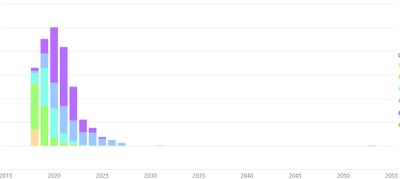
Here is the function I wrote. Then I dropped it into tooltips and filtered it by 1.
Column = IF([Year] >= YEAR(NOW()),"Future Year","")
Can someone help me?


- Mark as New
- Bookmark
- Subscribe
- Mute
- Subscribe to RSS Feed
- Permalink
- Report Inappropriate Content
Hi @Stuznet, you could create a calculated column that shows 0 if year(date) < year(today) and the value with future dates.
Hope this help you, apologies for my bad english 
Best Regards, Marcos
- Mark as New
- Bookmark
- Subscribe
- Mute
- Subscribe to RSS Feed
- Permalink
- Report Inappropriate Content
@marcoslopezthank you for your input. I tried your suggested function.
Column = IF(YEAR([Date]) < YEAR(TODAY()),1,0)
I'm getting the same result as it shown on the chart from above.


- Mark as New
- Bookmark
- Subscribe
- Mute
- Subscribe to RSS Feed
- Permalink
- Report Inappropriate Content
Hi @Stuznet,
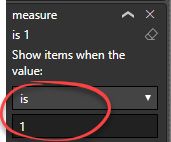
Please add below measure to visual level filters and set its value to 1.
CheckMeasure =
IF ( YEAR ( SELECTEDVALUE ( Table[Date] ) ) >= YEAR ( TODAY () ), 1, 0 )
Best regards,
Yuliana Gu
If this post helps, then please consider Accept it as the solution to help the other members find it more quickly.
- Mark as New
- Bookmark
- Subscribe
- Mute
- Subscribe to RSS Feed
- Permalink
- Report Inappropriate Content
@v-yulgu-msftI've tried the function you provided, unfortunately it is not the result I'm looking for.
I filtered is "1".
.
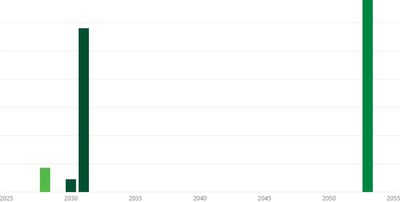
I would like to see the result from 2018 to 2023 like it shown below the chart.

And so for next year start from 2019 to 2024.
Thank you for your help.
- Mark as New
- Bookmark
- Subscribe
- Mute
- Subscribe to RSS Feed
- Permalink
- Report Inappropriate Content
Hi @Stuznet,
Please change the X-axis type from categorical to continuous for a test. If it still doesn't work, please share your .pbix file so that I can check for you.
Regards,
Yuliana Gu
If this post helps, then please consider Accept it as the solution to help the other members find it more quickly.
- Mark as New
- Bookmark
- Subscribe
- Mute
- Subscribe to RSS Feed
- Permalink
- Report Inappropriate Content
That I said was sth like having Column Total Invoices then
New Calculated Column:
Total Estimated Invoices =
if (
year(InvoiceDate) >= year( today() );
Total Invoices;
0
)
- Mark as New
- Bookmark
- Subscribe
- Mute
- Subscribe to RSS Feed
- Permalink
- Report Inappropriate Content
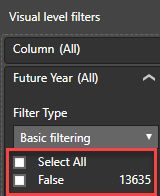
@marcoslopezI tried that and it giving false result.
Column = IF(YEAR([Date]) >= YEAR(TODAY()),[Total],0)


- Mark as New
- Bookmark
- Subscribe
- Mute
- Subscribe to RSS Feed
- Permalink
- Report Inappropriate Content

Helpful resources

Data Days 2026
Don't miss out on Data Days, June 15 through August 7. Learn Fabric, Power BI, SQL, AI and more.

Power BI DataViz World Championships - June 2026
A new Power BI DataViz World Championship is coming this June! Don't miss out on submitting your entry.

| User | Count |
|---|---|
| 22 | |
| 21 | |
| 20 | |
| 20 | |
| 11 |


| User | Count |
|---|---|
| 62 | |
| 55 | |
| 46 | |
| 45 | |
| 34 |


