cancel
Showing results for 
Search instead for 
Did you mean: 

The Power BI Data Visualization World Championships is back! It's time to submit your entry. Live now!

Reply
Anonymous
Not applicable

Filled map

Hi,
I want to try to create a filled map chart. I have my data : Country, Year, number of things.
I click the map icon, I select the country field (if I drag the field into "Legend" I can see my countries), but the map, for this countries, don't change color.
I try with an Excel file of the book that I study (Pro Power BI Desktop) and all run correctly.
I don't understand.
Thanks for the help.

1 ACCEPTED SOLUTION

Hi Francesco,

please try to mark your country-column with the appropriate data categoryScreenshot at Dez. 29 01-10-47.png


You can find a Demo PBIX here.


Hope this helps 🙂

Frank

View solution in original post

5 REPLIES 5
Baskar
Resident Rockstar
Resident Rockstar

1. U have to drop the country in Legend and Location in both.

2. If your column name is not Country , then u have to set the column Data Category is "Country / Region "


This will help u sure . look the image .1.JPG


If not helping u let me know i will help u sure 🙂 

Anonymous
Not applicable

Thank you Frank and Baskar,

My problem was the data category! 
I'm sorry, I have started to read my book only today, but I find PBI a fantastic tool. In the past I worked many years with Business Objects, but I think to find something easy and good for users like BO.
Thanks.


BetterCallFrank
Resolver IV
Resolver IV

Hey mate,


I assume you're using the ArcGIS maps - did you

1) put the "number of things" column into the "Color" section of the map?

2) mark the country column with the data category Country/Region?


HTH,

Frank

Anonymous
Not applicable

Hi Frank,

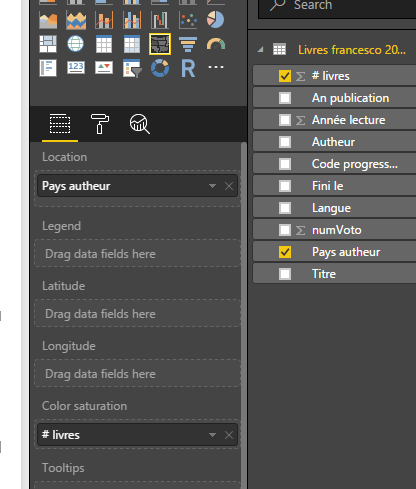
Thanks for your help, I use the basic objects that I find in PBI Desktop. Look at the image.

Francesco


Capture.PNG


Hi Francesco,

please try to mark your country-column with the appropriate data categoryScreenshot at Dez. 29 01-10-47.png


You can find a Demo PBIX here.


Hope this helps 🙂

Frank

Helpful resources

Announcements
Power BI DataViz World Championships

Power BI Dataviz World Championships

The Power BI Data Visualization World Championships is back! It's time to submit your entry.

January Power BI Update Carousel

Power BI Monthly Update - January 2026

Check out the January 2026 Power BI update to learn about new features.

FabCon Atlanta 2026 carousel

FabCon Atlanta 2026

Join us at FabCon Atlanta, March 16-20, for the ultimate Fabric, Power BI, AI and SQL community-led event. Save $200 with code FABCOMM.