Join us at FabCon Atlanta from March 16 - 20, 2026, for the ultimate Fabric, Power BI, AI and SQL community-led event. Save $200 with code FABCOMM.
Register now!Learn from the best! Meet the four finalists headed to the FINALS of the Power BI Dataviz World Championships! Register now
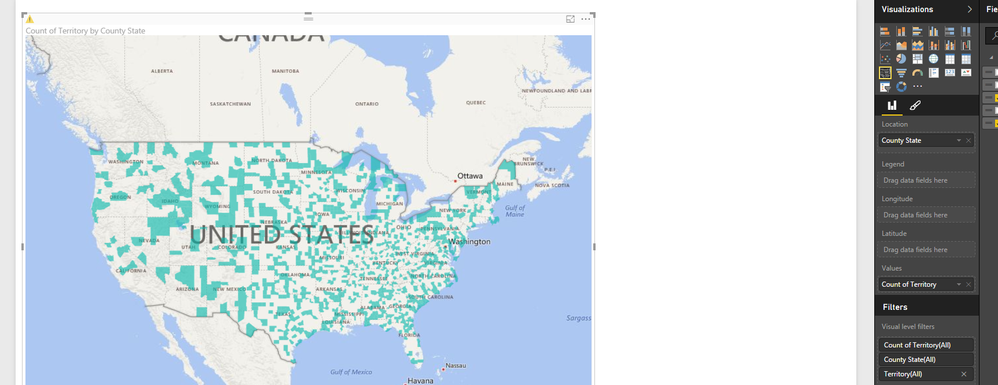
Using the control Filled Map to display the territories by county that each sales person is responsible for. Have Location set up as County State, Legend as TerID and value as Count of County. If all TerID are selected, I get the error “Too many values. Not showing all data. Filter the data or choose another field”. If I select individual TerIDs the error goes away. How do I get all territories to show on the filled map without losing data?
If you remove the field from the 'Legend' bucket, the 'Too many ...' warning will go away.
I'm currently running into the same "Too Many Values.." error using the latest Power BI Desktop even though I only have 68 possible distinct values. I'm disappointed to see that this bug hasn't been fixed yet. Common Power BI team.
That did not work. I removed the legend bucket and still receive that error message. In addition, if I do not use the legend bucket how do I get the map to group by the different terrritories.
Share feedback directly with Fabric product managers, participate in targeted research studies and influence the Fabric roadmap.
Check out the February 2026 Power BI update to learn about new features.
| User | Count |
|---|---|
| 61 | |
| 59 | |
| 42 | |
| 18 | |
| 15 |
| User | Count |
|---|---|
| 109 | |
| 102 | |
| 39 | |
| 29 | |
| 29 |