Get certified for free when you join Fabric Data Days 2026 and dive into Fabric, Power BI, SQL, AI, and other essential data skills.
Join nowTry your skills in the Power BI Dataviz World Championship! Round one ends June 26. Join now
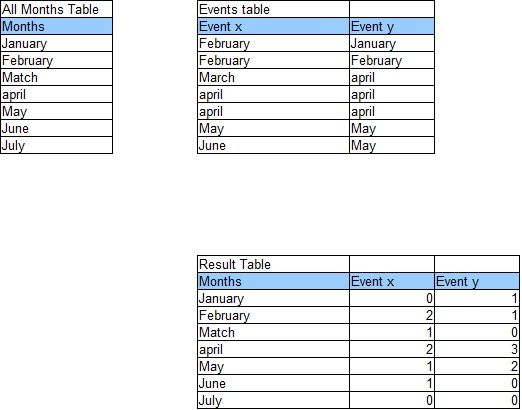
I have 2 tables, 'All months table' and 'Events table'. I would like to get a new table (Result Table) in which the events are summarized and the missing months are filled with zero. Does anyone knows how I can do this?
Solved! Go to Solution.
Hi @Ralf123,
First of all, I would model your data in your Events table differently, like this:
| Events table | |
| EventName | Date |
| Event X | 01/02/2017 |
| Event X | 02/02/2017 |
| Event X | 01/03/2017 |
| Event X | 01/04/2017 |
| Event X | 02/04/2017 |
| Event X | 01/05/2017 |
| Event X | 01/06/2017 |
| Event Y | 01/01/2017 |
| etc… |
I used a "Date" column because you have more than one instance of the same event per month.
Then, I would create a Calendar table, rather than an All Months table, e.g.:
Calendar =
ADDCOLUMNS (
CALENDAR ( "01-Jan-2010", "31-Dec-2020" ),
"Year", YEAR ( [Date] ),
"Month", FORMAT ( [Date], "MM" ),
"Month Name", FORMAT ( [Date], "MMM" )
)Then create a relationship between the two tables using the [Date] column.
Then you should be able to create a Matrix visual that resembles your Result Table.
Let me know how you get on.
Hi @Ralf123,
First of all, I would model your data in your Events table differently, like this:
| Events table | |
| EventName | Date |
| Event X | 01/02/2017 |
| Event X | 02/02/2017 |
| Event X | 01/03/2017 |
| Event X | 01/04/2017 |
| Event X | 02/04/2017 |
| Event X | 01/05/2017 |
| Event X | 01/06/2017 |
| Event Y | 01/01/2017 |
| etc… |
I used a "Date" column because you have more than one instance of the same event per month.
Then, I would create a Calendar table, rather than an All Months table, e.g.:
Calendar =
ADDCOLUMNS (
CALENDAR ( "01-Jan-2010", "31-Dec-2020" ),
"Year", YEAR ( [Date] ),
"Month", FORMAT ( [Date], "MM" ),
"Month Name", FORMAT ( [Date], "MMM" )
)Then create a relationship between the two tables using the [Date] column.
Then you should be able to create a Matrix visual that resembles your Result Table.
Let me know how you get on.
Great, this did the trick.
You saved me a lot of time, thanks
Don't miss out on Data Days, June 15 through August 7. Learn Fabric, Power BI, SQL, AI and more.
Check out the May 2026 Power BI update to learn about new features.
| User | Count |
|---|---|
| 24 | |
| 21 | |
| 20 | |
| 17 | |
| 12 |
| User | Count |
|---|---|
| 64 | |
| 55 | |
| 42 | |
| 38 | |
| 30 |