Join us at FabCon Atlanta from March 16 - 20, 2026, for the ultimate Fabric, Power BI, AI and SQL community-led event. Save $200 with code FABCOMM.
Register now!The Power BI Data Visualization World Championships is back! It's time to submit your entry. Live now!
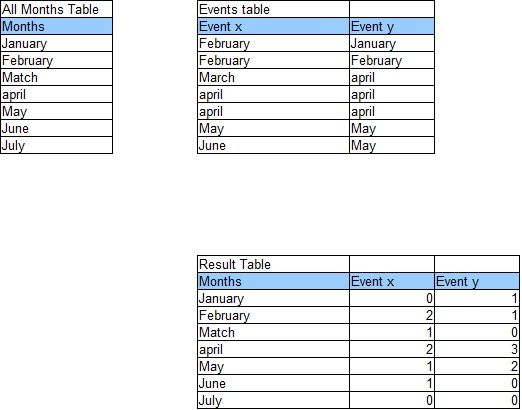
I have 2 tables, 'All months table' and 'Events table'. I would like to get a new table (Result Table) in which the events are summarized and the missing months are filled with zero. Does anyone knows how I can do this?
Solved! Go to Solution.
Hi @Ralf123,
First of all, I would model your data in your Events table differently, like this:
| Events table | |
| EventName | Date |
| Event X | 01/02/2017 |
| Event X | 02/02/2017 |
| Event X | 01/03/2017 |
| Event X | 01/04/2017 |
| Event X | 02/04/2017 |
| Event X | 01/05/2017 |
| Event X | 01/06/2017 |
| Event Y | 01/01/2017 |
| etc… |
I used a "Date" column because you have more than one instance of the same event per month.
Then, I would create a Calendar table, rather than an All Months table, e.g.:
Calendar =
ADDCOLUMNS (
CALENDAR ( "01-Jan-2010", "31-Dec-2020" ),
"Year", YEAR ( [Date] ),
"Month", FORMAT ( [Date], "MM" ),
"Month Name", FORMAT ( [Date], "MMM" )
)Then create a relationship between the two tables using the [Date] column.
Then you should be able to create a Matrix visual that resembles your Result Table.
Let me know how you get on.
Hi @Ralf123,
First of all, I would model your data in your Events table differently, like this:
| Events table | |
| EventName | Date |
| Event X | 01/02/2017 |
| Event X | 02/02/2017 |
| Event X | 01/03/2017 |
| Event X | 01/04/2017 |
| Event X | 02/04/2017 |
| Event X | 01/05/2017 |
| Event X | 01/06/2017 |
| Event Y | 01/01/2017 |
| etc… |
I used a "Date" column because you have more than one instance of the same event per month.
Then, I would create a Calendar table, rather than an All Months table, e.g.:
Calendar =
ADDCOLUMNS (
CALENDAR ( "01-Jan-2010", "31-Dec-2020" ),
"Year", YEAR ( [Date] ),
"Month", FORMAT ( [Date], "MM" ),
"Month Name", FORMAT ( [Date], "MMM" )
)Then create a relationship between the two tables using the [Date] column.
Then you should be able to create a Matrix visual that resembles your Result Table.
Let me know how you get on.
Great, this did the trick.
You saved me a lot of time, thanks
The Power BI Data Visualization World Championships is back! It's time to submit your entry.
Check out the January 2026 Power BI update to learn about new features.
| User | Count |
|---|---|
| 56 | |
| 40 | |
| 38 | |
| 21 | |
| 20 |
| User | Count |
|---|---|
| 142 | |
| 105 | |
| 63 | |
| 36 | |
| 35 |