cancel
Showing results for 
Search instead for 
Did you mean: 

We've captured the moments from FabCon & SQLCon that everyone is talking about, and we are bringing them to the community, live and on-demand. Starts on April 14th. Register now

Reply
Anonymous
Not applicable

Fill missing dates with zero

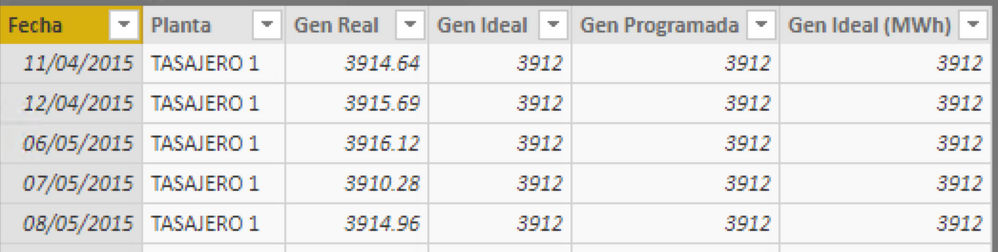
Hi, I've a table (Gen Colgener) with some data but some dates are missing. 

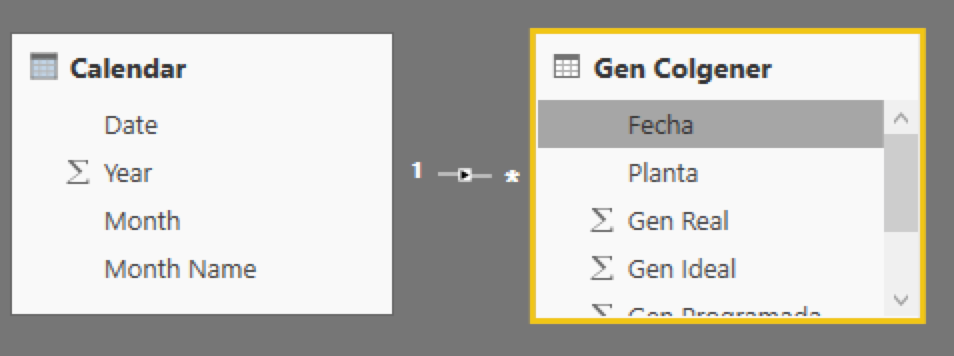
This table has a relationship with a Calendar table.... 

I wish to fullfill the data in Gen Colgener with zero, for that dates missing to elaborate continuous line graphs


Captura de pantalla 2018-10-25 a la(s) 2.27.14 p. m..pngCaptura de pantalla 2018-10-25 a la(s) 2.27.38 p. m..png

5 REPLIES 5
edhans
Community Champion
Community Champion

In the Query Editor:

  • Click on that column of dates
  • On the Transform ribbon, click Replace
  • type "null" to search for, and "0" to replace with (without the quotes


Alternatively, just filter out dates with null data so that data isn't in the model.


Did I answer your question? Mark my post as a solution!
Did my answers help arrive at a solution? Give it a kudos by clicking the Thumbs Up!

DAX is for Analysis. Power Query is for Data Modeling


Proud to be a Super User!

MCSA: BI Reporting
Anonymous
Not applicable

The problem isn't null data, the problem is that some dates aren't in the original data, in the photo you can notice how the data jump from April 12 of 2015, to May 6..... I wish a measure o column that fill the data with zero for the dates between apr 12 and may 6

edhans
Community Champion
Community Champion

Ok. You need to create a date table that has all dates from Jan 1, first year through at least the last date in your model, but I prefer Dec 31, last year. (assuming calendar - if fiscal, your dates will be a bit different).


In the Query Editor:

  1. Merge the Sales data table with the Calendar table using the DATE fields. DO a "Right Outer" join. This will bring in all dates from the calendar table.
  2. Expand the Calendar Date.
  3. Now you have a bunch of nulls. This is good.
  4. Right-click on the Sales data and Replace Values. Replace null with 0.
  5. Delete the original Date column in the Sales table.
  6. Rename the expanded date column from the calendar table from probalby Date.1 to Date.
  7. Close the query editor and tell it to apply changes.

Now put your Date from the Sales table in to the line chart. You should see the 0's graphed.


Did I answer your question? Mark my post as a solution!
Did my answers help arrive at a solution? Give it a kudos by clicking the Thumbs Up!

DAX is for Analysis. Power Query is for Data Modeling


Proud to be a Super User!

MCSA: BI Reporting
Anonymous
Not applicable

Yeah, I did it but doesn't know how to fill the field "Planta", if you notice those are text are there are some of them. 😕

edhans
Community Champion
Community Champion

Use the Fill Down feature for those columns, or leave them null. Depends on what you want. Do the FIll Down step (or Fill up, or both if necessary) after my step #6 above.


You can do that for each column. Or do a replace with "No Sales" or whatever you want.


Did I answer your question? Mark my post as a solution!
Did my answers help arrive at a solution? Give it a kudos by clicking the Thumbs Up!

DAX is for Analysis. Power Query is for Data Modeling


Proud to be a Super User!

MCSA: BI Reporting
Helpful resources

Announcements
New to Fabric survey Carousel

New to Fabric Survey

If you have recently started exploring Fabric, we'd love to hear how it's going. Your feedback can help with product improvements.

Power BI DataViz World Championships carousel

Power BI DataViz World Championships - June 2026

A new Power BI DataViz World Championship is coming this June! Don't miss out on submitting your entry.

Join our Fabric User Panel

Join our Fabric User Panel

Share feedback directly with Fabric product managers, participate in targeted research studies and influence the Fabric roadmap.

March Power BI Update Carousel

Power BI Community Update - March 2026

Check out the March 2026 Power BI update to learn about new features.