This is best Fabric, Power BI, SQL and AI community event. How do we know? The last event sold out! Save €200 with code FABCMTY200.
Register nowA new Data Days event is coming soon! This time we’re going bigger than ever. Fabric, Power BI, SQL, AI and more. Don't miss out.
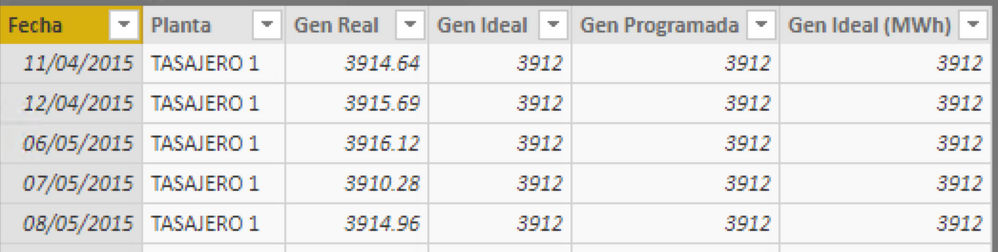
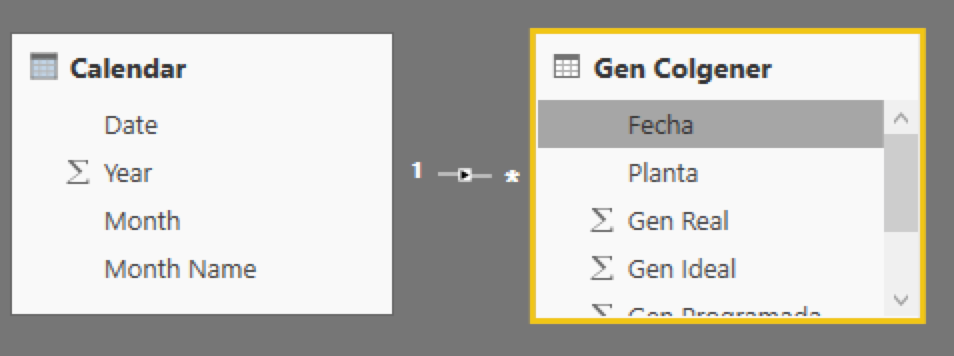
Hi, I've a table (Gen Colgener) with some data but some dates are missing.
This table has a relationship with a Calendar table....
I wish to fullfill the data in Gen Colgener with zero, for that dates missing to elaborate continuous line graphs
In the Query Editor:
Alternatively, just filter out dates with null data so that data isn't in the model.
DAX is for Analysis. Power Query is for Data Modeling
Proud to be a Super User!
MCSA: BI ReportingThe problem isn't null data, the problem is that some dates aren't in the original data, in the photo you can notice how the data jump from April 12 of 2015, to May 6..... I wish a measure o column that fill the data with zero for the dates between apr 12 and may 6
Ok. You need to create a date table that has all dates from Jan 1, first year through at least the last date in your model, but I prefer Dec 31, last year. (assuming calendar - if fiscal, your dates will be a bit different).
In the Query Editor:
Now put your Date from the Sales table in to the line chart. You should see the 0's graphed.
DAX is for Analysis. Power Query is for Data Modeling
Proud to be a Super User!
MCSA: BI ReportingYeah, I did it but doesn't know how to fill the field "Planta", if you notice those are text are there are some of them. 😕
Use the Fill Down feature for those columns, or leave them null. Depends on what you want. Do the FIll Down step (or Fill up, or both if necessary) after my step #6 above.
You can do that for each column. Or do a replace with "No Sales" or whatever you want.
DAX is for Analysis. Power Query is for Data Modeling
Proud to be a Super User!
MCSA: BI ReportingSign up to receive a private message when registration opens and key events begin.
If you have recently started exploring Fabric, we'd love to hear how it's going. Your feedback can help with product improvements.
| User | Count |
|---|---|
| 33 | |
| 25 | |
| 23 | |
| 20 | |
| 15 |
| User | Count |
|---|---|
| 64 | |
| 41 | |
| 27 | |
| 22 | |
| 22 |