This time we’re going bigger than ever. Fabric, Power BI, SQL, AI and more. We're covering it all. You won't want to miss it.
Learn moreLevel up your Power BI skills this month - build one visual each week and tell better stories with data! Get started
Hello,
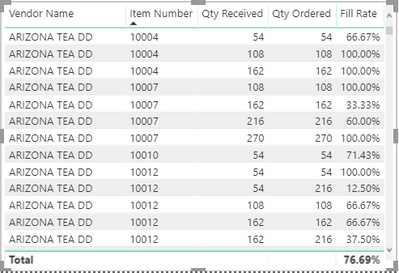
I have a fill rate key measure that doesn't appear to be working. The fill rate is calculating correctly in the first table (shown below) that displays Receipt Date, Vendor Name, PO Number, and Item Number. It does not appear to be calculating properly in the second table (shown below) which includes Vendor Name and Item Number. I think this may have to do with my table relationships but I haven't been able to figure it out. I've also dropped the pbix file in a DropBox folder and linked below.
https://1drv.ms/u/s!AiFttrDOn_FqgQ0FMacHzVmVu9mh
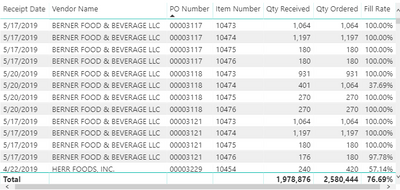
Table 1
Table 2
Any help is appreciated.
JDaly
Solved! Go to Solution.
@Anonymous ,
In the Visualizations pane, right-click [Qty Received] dragged to Values, and change the aggregation to Sum.
https://docs.microsoft.com/en-us/power-bi/service-aggregates
@Anonymous ,
In the Visualizations pane, right-click [Qty Received] dragged to Values, and change the aggregation to Sum.
https://docs.microsoft.com/en-us/power-bi/service-aggregates
Check out the April 2026 Power BI update to learn about new features.
Sign up to receive a private message when registration opens and key events begin.
If you have recently started exploring Fabric, we'd love to hear how it's going. Your feedback can help with product improvements.
| User | Count |
|---|---|
| 38 | |
| 29 | |
| 28 | |
| 20 | |
| 18 |
| User | Count |
|---|---|
| 66 | |
| 36 | |
| 30 | |
| 25 | |
| 24 |