
Get certified for free when you join Fabric Data Days 2026 and dive into Fabric, Power BI, SQL, AI, and other essential data skills.
Join nowData Days is here! Join us now for 60+ days of learning, challenges, and connection. Learn more
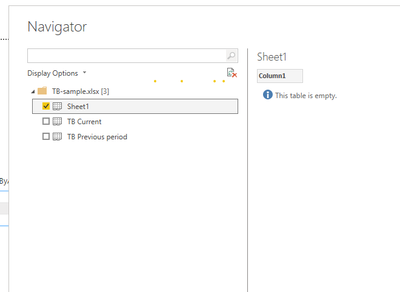
When I load one single excel file,
In power query, there are three tables being imported. 2 other tables are not required. How to solve this issue ? Thanks
Hi @mkathi0405 ,
Is your issue solved?
If the issue has been solved, please adopt your solution to help others.
Thanks! 😉
Best Regards,
Link
If this post helps then please consider Accept it as the solution to help the other members find it more quickly.
Hi @mkathi0405,
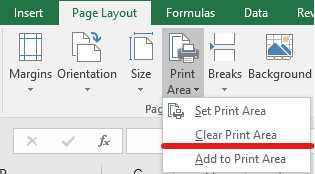
Maybe you can try to clear print area and check:
Best Regards,
Link
If this post helps then please consider Accept it as the solution to help the other members find it more quickly.
@mkathi0405
When you use Excel as the data source, it presents the option for you to choose the sheets or tales that you need to import, tick the ones you need and click the Transform button download.
⭕ Subscribe and learn Power BI from these videos
⚪ Website ⚪ LinkedIn ⚪ PBI User Group
Thanks for the replies. Even if i select the desired worksheet, i'm still getting the output below. I dont understand the entries 2 and 3. No matter what I did , I am still seeing the two entries. Anything i did wrong or any remedies? Cheers
@mkathi0405
From here you can click on the "Kind " column arrow and filter only Sheet.
⭕ Subscribe and learn Power BI from these videos
⚪ Website ⚪ LinkedIn ⚪ PBI User Group
Don't miss out on Data Days, June 15 through August 7. Learn Fabric, Power BI, SQL, AI and more.
Check out the May 2026 Power BI update to learn about new features.
| User | Count |
|---|---|
| 23 | |
| 23 | |
| 21 | |
| 20 | |
| 15 |
| User | Count |
|---|---|
| 58 | |
| 54 | |
| 42 | |
| 30 | |
| 24 |