cancel
Showing results for 
Search instead for 
Did you mean: 

We've captured the moments from FabCon & SQLCon that everyone is talking about, and we are bringing them to the community, live and on-demand. Starts on April 14th. Register now

Reply
firasath
Regular Visitor

Figure Out How To Filter

Hi,


I have Heacount data in a table where in the column header different Line-of-Business (LOB) are listed and in rows their month wise headcount data is updated as displayed in below table. Here each LOB is either related to a Consumer Segment or Non-Consumer Segment. I'm using stacked chart to display the statistics in Power BI. Now the requirement is to filter the LOBs based on segment. I cannot make that as I can't create relationship to map LOBs with Segment to filter based on Segment. Please note that in my table I have monthly data since 2016 onwards. Please suggest the solution to achieve it.  


MonthLOB-1LOB-2LOB-3LOB-4LOB-5LOB-6LOB-7
01/01/202340406634533388
01/02/202334445339593679
01/03/202340406634533388
01/04/202334445339593679


LOBSEGMENT
LOB-1Consumer
LOB-2Non-Consumer
LOB-3Consumer
LOB-4Consumer
LOB-5Non-Consumer
LOB-6Consumer
LOB-7Consumer


1 ACCEPTED SOLUTION
Anonymous
Not applicable

Hi @firasath ,
According to the data you provided, here some steps that I want to share, you can check them if they suitable for your requirement.
1.Open Power BI Desktop and go to the "Home" tab. Click on "Transform Data" to open Power Query Editor.
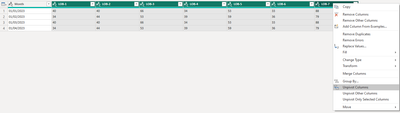
2.Select the LOB columns (LOB-1, LOB-2, etc.), right click and select  "Unpivot Columns",

vheqmsft_0-1704941168228.png

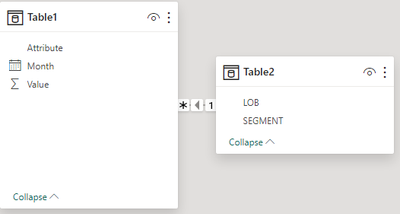
3.Close & Apply, then go to desktop table view and create relationship between Lob and Attribute

vheqmsft_2-1704941387862.png

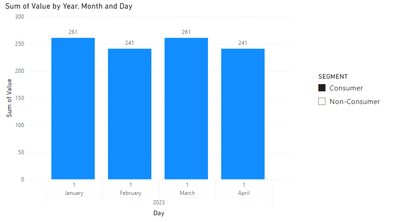
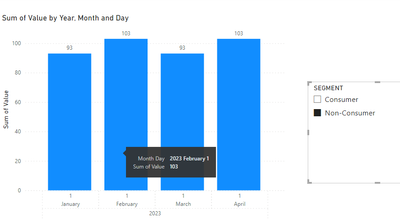
4.Final output

vheqmsft_3-1704941413099.png

vheqmsft_4-1704941423233.png


Best regards

Albert He


If this post helps, then please consider Accept it as the solution to help the other members find it more quickly


View solution in original post

2 REPLIES 2
Anonymous
Not applicable

Hi @firasath ,
According to the data you provided, here some steps that I want to share, you can check them if they suitable for your requirement.
1.Open Power BI Desktop and go to the "Home" tab. Click on "Transform Data" to open Power Query Editor.
2.Select the LOB columns (LOB-1, LOB-2, etc.), right click and select  "Unpivot Columns",

vheqmsft_0-1704941168228.png

3.Close & Apply, then go to desktop table view and create relationship between Lob and Attribute

vheqmsft_2-1704941387862.png

4.Final output

vheqmsft_3-1704941413099.png

vheqmsft_4-1704941423233.png


Best regards

Albert He


If this post helps, then please consider Accept it as the solution to help the other members find it more quickly


hvnter
Resolver I
Resolver I

You need to be able to establish a relationship between your date dimension and your fact table.  Without the relationship, Power BI has no way of understanding (accurately) how the data tables relate.  You should model your fact table to have a DateKey 

Helpful resources

Announcements
New to Fabric survey Carousel

New to Fabric Survey

If you have recently started exploring Fabric, we'd love to hear how it's going. Your feedback can help with product improvements.

Power BI DataViz World Championships carousel

Power BI DataViz World Championships - June 2026

A new Power BI DataViz World Championship is coming this June! Don't miss out on submitting your entry.

Join our Fabric User Panel

Join our Fabric User Panel

Share feedback directly with Fabric product managers, participate in targeted research studies and influence the Fabric roadmap.

March Power BI Update Carousel

Power BI Community Update - March 2026

Check out the March 2026 Power BI update to learn about new features.