cancel
Showing results for 
Search instead for 
Did you mean: 

Try your skills in the Power BI Dataviz World Championship! Round one ends June 26. Join now

Reply
igordossantos
Helper I
Helper I

FORMAT setting integer to string - DAX

All, 

What am I doing in correctly on the formula below?


% Profiles Started = VALUE ( FORMAT ( DIVIDE ( TotalNumberOfSkills, [Total # Resources] ) * 100, "0.0" ) )


The result of the above is returning a string value.


Am I doing something incorrectly? Is there an alternative to formatting percentages in DAX? 

2 REPLIES 2
v-ljerr-msft
Microsoft Employee
Microsoft Employee

Hi @igordossantos,


You don't need to use DAX functions to format the value of the measure in this scenario. In Power BI Desktop, you can just use Format option under Modeling tab to format the measure as Vvelarde mentioned above.


You can just use the formula below for the measure "% Profiles Started", then follow steps below to change format to Percentage for it.

% Profiles Started = DIVIDE ( TotalNumberOfSkills, [Total # Resources] )

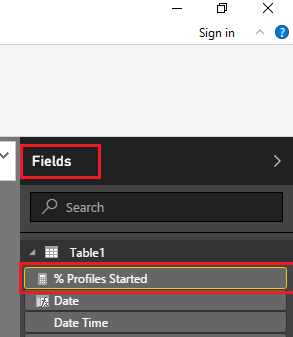
1. Select the measure you want to format on the Fields.


m1.PNG


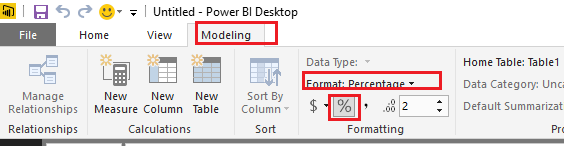
2. Under Modeling tab, just choose Percentage for the Format of the measure.


f1.PNG


Regards

Vvelarde
Community Champion
Community Champion

@igordossantos


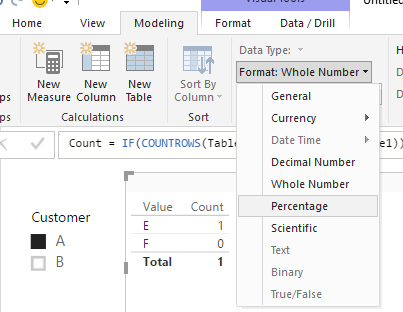
The change the format you can go to modeling:


%.png


Lima - Peru

Helpful resources

Announcements
Fabric Data Days is here Carousel

Fabric Data Days 2026

Don't miss out on Data Days, June 15 through August 7. Learn Fabric, Power BI, SQL, AI and more.

May Power BI Update Carousel

Power BI Monthly Update - May 2026

Check out the May 2026 Power BI update to learn about new features.

Power BI DataViz World Championships carousel

Power BI DataViz World Championships - June 2026

A new Power BI DataViz World Championship is coming this June! Don't miss out on submitting your entry.